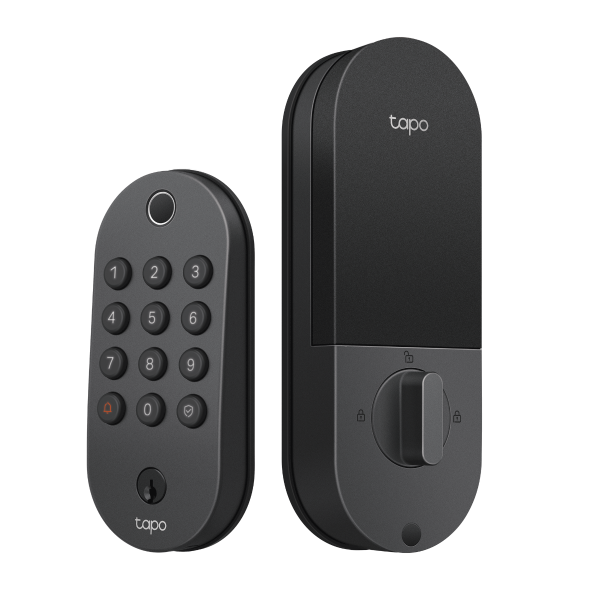
Best Smart Lock for Front Door: Tapo's Practical Buyer's Guide
Losing your keys, letting in a family member while you're at work, or wondering whether your front door is locked; these are everyday situations where a smart lock makes a real difference. The best smart lock for your front door replaces your existing deadbolt with a keyless, app-connected lock that you can control from anywhere. Most installations take about 15 minutes and require nothing more than a screwdriver.
This guide covers what a smart lock does, which features matter for different households, and how to choose the right option from Tapo's range of front door smart locks.
Key Takeaways
- A smart lock replaces your existing deadbolt and lets you lock, unlock, and manage access from an app. No keys required, and no professional installation needed.
- The access method is an important decision. Fingerprint entry is fast and hands-free; palm vein recognition is more secure because it reads internal vascular patterns that can't be copied or lifted from a surface.
- Smart locks work without Wi-Fi. Most support local Bluetooth access when Wi-Fi is unavailable, and some can be set up and used entirely without a Wi-Fi connection.
- Tapo smart locks include core features with no subscription required, including app control, activity logs, auto-lock, and temporary access codes for guests.
- The right choice comes down to three things: how you want to unlock your door, who else needs access, and whether the lock fits your existing smart home setup.
Why Upgrade to a Smart Lock? Benefits, Features, and How They Work
A smart lock for your front door does more than replace a key. It gives you control over who gets in, when they get in, and a record of every time the door opens or closes. Understanding what a smart lock can do makes it easier to decide whether it fits your household, and which features you need.
How a Smart Lock Works on a Front Door
A smart lock is a deadbolt replacement that fits where your existing deadbolt sits, uses the same door prep, and requires no major modifications to your door or frame. It gives you multiple ways to unlock your door. Keypad, biometric, app, and physical key backup are common options, and access is managed through a companion app.
Wi-Fi connectivity unlocks smart features such as remote locking and unlocking, activity logs, real-time alerts, and temporary access codes. Most models connect via Wi-Fi for remote access and Bluetooth for local app control when you're near the door. Keypad and physical key access work independently of any wireless connection.
Benefits of Upgrading to a Smart Lock
Front door smart locks remove several everyday friction points that a traditional lock can't address.
You can lock or unlock your door from anywhere. If you left in a rush and can't remember whether you locked up, a quick check in the app tells you, and you can lock it remotely if needed. If a visiting friend arrives at the house before you, you can let them in without exchanging a spare key.
Temporary access codes let you give guests, cleaners, or tradespeople their own time-limited entry. Codes can be set to work only on certain days or within a specific window, and you can remove them at any time. An activity log records every lock and unlock with a timestamp, so you always know who came and went.
Auto-lock closes things up automatically after a set time, which is useful for households with kids or anyone who regularly forgets to lock the door.
Front Door Smart Lock Installation: What to Expect
Installation is a straightforward DIY project for most households. You'll remove your existing deadbolt, fit the new lock in its place, and connect it to the app. All mounting tools are included in the box, and the only thing you need to bring is a screwdriver.
Most smart lock installations take around 15 minutes. No drilling, no rewiring, and no need to call a professional. For Tapo smart locks, the app walks you through each step with on-screen instructions.
Before buying, check that your door is compatible. Tapo smart locks fit doors with a standard backset of 60 or 70 mm and a thickness between 35 and 55 mm, which covers most standard front doors in North America.
Smart Lock Features: A Plain-Language Guide
When you're comparing keyless front door locks, you'll encounter a consistent set of features across most models. Here's what each one means in practice, and who it's most useful for.
Keypad and PIN Entry
A keypad is one of the most flexible access methods for households with multiple people coming and going. Everyone gets their own numeric code, and you control each one from the app. Codes can be permanent for family members, scheduled to work only during set hours for a dog walker or cleaning service, or one-time only for guests and delivery couriers. If someone's access needs to change, you update or delete the code without touching the lock.
For households where multiple people need reliable, keyless access to the front door, a keypad is the practical foundation.
Fingerprint Recognition
Fingerprint recognition is a fast way to get through the door. Touch the sensor and the lock opens in under a second. Most smart locks store up to 100 fingerprints so that every household member can register. It's a natural fit for anyone who wants easy entry without memorizing a code.
Palm Recognition
Palm recognition is a step up from fingerprint in both convenience and security. The sensor uses near-infrared light to read the unique vein pattern beneath the skin of your palm. You hold your hand near the sensor without touching it, and the door unlocks. Because the scan reads internal vascular patterns rather than a surface impression, it can’t be copied from a photo or a lifted fingerprint.
The sensor works reliably across different hand types, including children's hands, elderly hands, and hands that are wet, dirty, or sweaty. It's the strongest biometric option, and adds the convenience of fully contactless entry.
DuoBiometric™ Access
DuoBiometric™ access combines palm vein recognition and fingerprint recognition in a single lock. Palm is the primary method for everyday use; fingerprint is the reliable backup when palm isn't convenient. Having both means you're never dependent on a single biometric, and you get the advanced security of palm vein recognition alongside the speed and familiarity of fingerprint. It's the most capable access option available, and the right choice for tech-forward households who want maximum flexibility and the highest level of biometric security.
Physical Key Backup
Every smart lock includes a physical key slot as a last-resort backup. If the battery runs critically low before you've had a chance to recharge, the key gets you in. It's not designed to be your primary access method, but it provides an important safety net for anyone who wants a reliable fallback regardless of battery level or connectivity.
Remote Access
Remote access lets you lock or unlock your door from anywhere, using an app on your phone. You can let in a family member who forgot their code, give a tradesperson access while you're at work, or lock the door from your office if you missed it the way out. The activity log updates in real time, so you can see exactly when the door was opened or locked and by which method. It's especially useful for anyone who regularly lets in guests and service providers when they're not home.
Activity History
The activity log keeps a timestamped record of every lock and unlock event, including which access method was used. For households with multiple people coming and going, it provides a clear picture of door activity without needing to ask anyone.
For short-term rentals, it provides a record of every guest's entry and exit. Parents can check whether the kids got home from school, when the cleaner came and left, or whether the door was locked before bed. It's a straightforward feature that brings awareness and accountability at the front door.
Auto-Lock
Auto-lock secures the door automatically after a set time, or when the door sensor detects it has closed, so you never have to wonder whether you remembered to lock up. Some models trigger auto-lock on a timer; others use a door sensor to lock the moment the door shuts. This feature removes one of the most common sources of second-guessing for busy households, families with children or teenagers, or anyone who tends to leave in a rush.
Voice Control
Voice control connects your smart lock to platforms like Amazon Alexa, Google Assistant, and Samsung SmartThings, so you can lock the door with a simple voice command as part of your existing smart home routine. A PIN code is required when unlocking via a voice assistant, which adds a practical layer of security against accidental or unauthorized voice commands. If you’re already using a smart home ecosystem, it's a natural extension of how you already manage your home.
Temporary Access Codes
Temporary access codes are time-limited PIN codes that expire automatically once their window has passed. You set the hours and days they work, and the code stops functioning on its own with no need to remember to delete it afterward. For properties with rental guests, and homes with dog walkers, cleaners, or recurring visitors who need access only during specific windows, temporary codes are the cleanest solution.
The Best Tapo Smart Locks for Front Doors
All three Tapo smart locks below share a strong common foundation. Every model includes six or more ways to access your door, a fingerprint sensor that stores up to 100 fingerprints, a keypad with peek-proof PIN entry, remote app control over Wi-Fi, local Bluetooth access, physical backup keys, auto-lock, a detailed activity log, temporary and scheduled access codes, and USB-C charging.
Each one is compatible with Amazon Alexa, Google Assistant, and Samsung SmartThings (check product details for compatibility). Core features don’t require a subscription, and installation is DIY-friendly with all mounting tools included.
Where the models differ is in access methods, weatherproofing, and battery design. Those differences determine which lock best fits your household.
Tapo DL105: Best for Fingerprint Access and Long Battery Life
The Tapo DL105 is the right choice for households that want reliable fingerprint access and the longest possible time between charges. Based on Tapo laboratory tests, its 7,800 mAh rechargeable lithium-ion battery lasts up to one year in Wi-Fi mode, and extends further in Bluetooth-only mode for households that don't need remote access.
If you want to set up your lock and rarely think about charging it, the long battery life is a standout advantage. Recharging is straightforward via the built-in USB-C port, and in the rare case that the battery runs out before you get to it, an exterior USB-C emergency port keeps the lock accessible.
The DL105 carries an IP54 rating, meaning it resists dust and splashing water from any direction. It performs well in covered entryways and most standard front door installations.
Tapo DL110: Best for Front Door Coverage With Built-In Doorbell Alerts
For households that want a smart lock and doorbell notification in a single front door device, the Tapo DL110 covers both without mounting two separate units. When a visitor presses the doorbell button, you get an alert on your phone and an audible ring sounds inside the home. It keeps your entryway clean and simple while covering two of the most common front door needs in one installation.
What sets the DL110 apart is its IP65 rating. Full dust protection and resistance to water jets from any direction make it the most capable option for exposed front doors that face direct rain, wind, and temperature swings year-round. The one-year rechargeable battery keeps maintenance to a minimum.
Tapo DL130: Best for Contactless Biometric Entry
DuoBiometric™ access is a significant step forward in residential smart lock technology, and the Tapo DL130 is the only lock in the range that has it. In daily use, that means holding your palm near the sensor and walking through the door without fumbling for a key or remembering a code. Fingerprint recognition is a fast and reliable backup when palm isn't convenient, giving you two biometric options built into a single lock.
The security advantage of palm vein recognition goes beyond convenience. The sensor uses near-infrared light to read the unique vein pattern beneath the skin of your palm. This internal biometric data can’t be copied from a photo or lifted from a surface.
If security is your top priority, the combination of internal biometrics and liveness detection sets palm vein recognition apart. The sensor only responds to a real, living hand. Not a replica, a cast, or other attempts to mimic one. Vein patterns are also unique to each person, so even identical twins register differently. The sensor is also designed for real-world use, reading reliably across different hand types, including children's hands, elderly hands, and hands that are wet, dirty, or sweaty.
The dual-battery system is designed so the lock never goes offline during charging. When you remove the main battery pack to recharge it, a built-in backup battery keeps the lock running. Once the main battery is reinstalled, it automatically recharges the backup. One full charge lasts over a year under typical conditions, based on Tapo lab tests. The DL130 also includes a door sensor that triggers an auto-lock the moment the door closes, ensuring the door is always secured the instant it shuts, without any delay or manual action required. An IP65 rating handles year-round outdoor use.
Tapo Smart Front Door Locks Compared
Choosing between the three models comes down to a few key differences that will matter most for your household. Here is how they compare.
|
Feature |
Tapo DL105 |
Tapo DL110 |
Tapo DL130 |
|
Access Methods |
Fingerprint, keypad, app (Wi-Fi), Bluetooth, voice control, physical key |
Fingerprint, keypad, app (Wi-Fi), Bluetooth, voice control, physical key |
DuoBiometric™ (palm + fingerprint), keypad, app (Wi-Fi), Bluetooth, voice control, physical key |
|
Battery |
7,800 mAh rechargeable lithium-ion; up to 1 year (Wi-Fi mode) |
Rechargeable; up to 1 year |
Dual-battery system (rechargeable main + built-in backup); over 1 year per charge |
|
Weatherproofing |
IP54 |
IP65 |
IP65 |
|
BHMA Certification |
Grade 3 |
Grade 2 |
Grade 2 |
|
Built-In Doorbell |
No |
Yes |
Yes |
|
Smart Home Compatibility |
Alexa, Google Assistant, SmartThings |
Alexa, Google Assistant, SmartThings |
Alexa, Google Assistant, SmartThings |
Find the Right Smart Lock for Your Front Door
Choosing the best smart lock for a front door comes down to how you want to get in, who else needs access, and how much you want to think about it after installation.
If minimal maintenance and reliable fingerprint entry are the priority, the DL105 and its exceptional battery life are the practical choice. If you want a single device that handles the lock and doorbell notifications on an exposed exterior door, the DL110 combines both with durable weather resistance. If you want the most advanced, contactless entry experience available, the DL130's DuoBiometric™ palm and fingerprint access is in a category of its own.
All three deliver core smart lock features with no subscription required. Explore the full Tapo smart entry collection to compare models and find the right fit for your home.
Frequently Asked Questions
What is the best Tapo smart lock for a front door?
It depends on how you want to get in. If speed and simplicity are the priority, the DL105 delivers fast fingerprint access with up to a year between charges under typical use. If your front door faces the elements and you want a doorbell notification built in, the DL110 combines both in one weather-resistant device. If you want to walk through your door without touching anything or remembering a code, the DL130 and its DuoBiometric™ access is the one to consider.
Can Tapo smart locks be installed on any front door?
Tapo smart locks fit most standard front doors. They require a door thickness between 35 and 55 mm and a backset of 60 or 70 mm, which covers most residential doors in North America. All models replace a standard deadbolt and include everything needed for installation except a screwdriver. If you have a non-standard door size or a mortise-style lock, check the compatibility details on the product page before purchasing.
Do smart locks work without Wi-Fi?
Yes. All Tapo smart locks support local Bluetooth access, so you can lock and unlock using the app when you're near the door, even if Wi-Fi is unavailable. The DL130 goes further: it supports a full Bluetooth-only setup mode, meaning you can install and use it without a Wi-Fi connection at all. In Bluetooth-only mode on the DL130, palm, fingerprint, and passcode entry all work normally, and you can control the lock via the app when you're within Bluetooth range.
What is the most secure type of smart lock?
For biometric security, palm vein recognition is the most secure access method available. The Tapo DL130 uses near-infrared light to scan the unique vein pattern beneath the skin of your palm. This internal biometric data cannot be copied from a photo, lifted from a surface, or replicated with a 3D model. The sensor uses liveness detection, meaning it only responds to a real, living hand, which makes it extremely difficult to spoof.
Do Tapo smart locks work with Alexa and Google Home?
Yes. Tapo smart locks (including the DL105, DL110, and DL130) are compatible with Amazon Alexa, Google Assistant, and Samsung SmartThings for voice control. Note that a PIN code is required when using a voice assistant to unlock the door. Check product details for full compatibility information.