Best Fingerprint Door Locks 2026: Tapo's Biometric Smart Lock Guide
If you're searching for the best fingerprint door lock, you already know what you want: a lock that recognizes you, not a key or a code. This guide covers Tapo's biometric smart lock range, with clear guidance on who each lock is built for. Choose from reliable fingerprint options, or the advanced DuoBiometric™ combination, which adds contactless palm vein recognition alongside fingerprint access in a single device.
Biometric locks replace physical keys and PIN codes with something that can't be borrowed, forgotten, or accidentally shared: your fingerprint or your palm. Access takes under a second, with no fumbling for keys and no code to remember. If you want more background on how the technology works, see our guide to biometric door locks.
Key Takeaways
- Biometric locks use your fingerprint or palm to unlock, with no key or code needed, making access faster, harder to share accidentally, and easier to remember than a code.
- Palm vein recognition is completely contactless and reads the vein pattern beneath your skin, making it significantly harder to replicate than a surface fingerprint.
- DuoBiometric™ technology combines palm vein and fingerprint recognition in a single lock, giving you two independent biometric methods in one device.
- All Tapo biometric smart locks include core features with no subscription required, including fingerprint access, app control, activity logs, and real-time alerts.
- Choosing the right lock comes down to three factors: how advanced you want your access method to be, whether you need a built-in doorbell, and the weatherproofing level your door requires.
What Makes a Lock "Biometric"?
A biometric door lock for home use grants access by reading a unique physical characteristic, such as a fingerprint or a palm vein pattern, rather than verifying a key or a memorized code. Unlike a PIN that can be shared, overheard, or forgotten, biometric data is tied to a specific person. You can't lend it, lose it, or accidentally text it to someone. The most advanced biometric locks now combine more than one method in a single device, so you're never dependent on just one way in.
Fingerprint Door Lock vs. Palm Recognition Door Lock: What's the Difference?
Both methods offer fast, keyless entry. The difference is in how they read you, and what that means for reliability and security.
Fingerprint Recognition
Fingerprint recognition is the established standard for biometric access. Press a finger to the sensor, and the lock reads your fingerprint and unlocks in under half a second. It's fast, widely available, and works well for most households. The practical limitation is that it requires contact with the sensor. For anyone with worn fingertips, dry or damaged skin, or frequently wet hands, a fingerprint sensor can be less consistent. A fingerprint door lock is a reliable, widely used option, though contactless biometric alternatives have become increasingly accessible for home use.
Palm Vein Recognition
Palm vein recognition takes a different approach. Instead of reading the surface of your skin, it uses near-infrared light to scan the unique vein pattern beneath your palm, with no sensor contact required. Because vein patterns are internal and invisible, they're extremely difficult to replicate, and the scan requires live blood flow to work. Even identical twins have different vein patterns. Palm recognition also works reliably across a wide range of hands: older hands, children's hands, and hands that are wet, dirty, or sweaty.
DuoBiometric™
DuoBiometric™ combines palm vein and fingerprint recognition in a single device, so you're never limited to one way of scanning. In practice, most household members will gravitate toward one method for daily entry. Palm recognition works reliably regardless of skin condition, age, or whether hands are wet or dirty, making it a consistent option for households where fingerprint sensors don't always perform well for everyone. Fingerprint is a quick and familiar backup, but having both means the lock adapts to the household rather than the other way around.
Tapo's Biometric Smart Lock Range
Tapo's biometric smart locks share a strong foundation. Every model supports fingerprint recognition and stores up to 100 fingerprints. Each one offers multiple ways to get in: fingerprint, keypad, app, Bluetooth, voice assistant, and a physical backup key.
Every lock’s keypad supports peek-proof entry, so you can add random digits before or after your code without triggering a lockout.
Guest access is flexible: create one-time codes for visitors, scheduled codes for service providers, or permanent codes for family members. Every lock includes a real-time activity log, instant alerts, and automatic lockout after repeated failed attempts, all without a subscription.
All three models below work with Amazon Alexa, Google Assistant, and Samsung SmartThings. Check product details for full compatibility information.
Tapo DL130: Best for Advanced Biometric Access
The Tapo DL130 is built for tech-forward households who want the most advanced entry experience in Tapo's range, and for families where fingerprint recognition doesn't work reliably for everyone. If you have young children whose fingerprints are still developing, elderly family members with worn or dry skin, or anyone who regularly comes home with wet or dirty hands, palm recognition solves the problem.
Hold your palm up to the sensor, and the door unlocks without your hand touching anything. The DL130 is Tapo's only lock that combines palm-vein recognition and fingerprint access in a single device, through its DuoBiometric™ system. Most households will use palm recognition as their primary method and fingerprint as a backup, but can easily flip that to fit each family member’s preference. Either way, you're never dependent on just one.
The security backing this up is solid. Palm vein patterns are internal and invisible beneath the skin, and the near-infrared sensor reads them without contact. A photo, a lifted print, or a 3D model cannot replicate them. All biometric data is protected with AES 128-bit encryption, a security standard used across banking and government systems, and stored directly on the device rather than in the cloud. When the door closes, a built-in door sensor detects it and locks automatically, so there's no timer to configure and no need to check the app before bed.
The dual-battery system keeps the lock running even when the main battery is out for charging. A built-in backup cell takes over seamlessly, and once the main battery is reinstalled, it automatically recharges the backup. One full charge lasts over a year, based on Tapo laboratory tests.
The DL130 is IP65 rated, meaning it's fully sealed against dust and handles direct water exposure from any direction, so rain, sprinklers, and humid climates aren't a concern. BHMA Grade 2 certified, it meets the rigorous security and durability standards required for residential front door use. It connects to both 2.4 GHz and 5 GHz Wi-Fi.
Tapo DL110: Best Fingerprint Lock with Built-In Doorbell
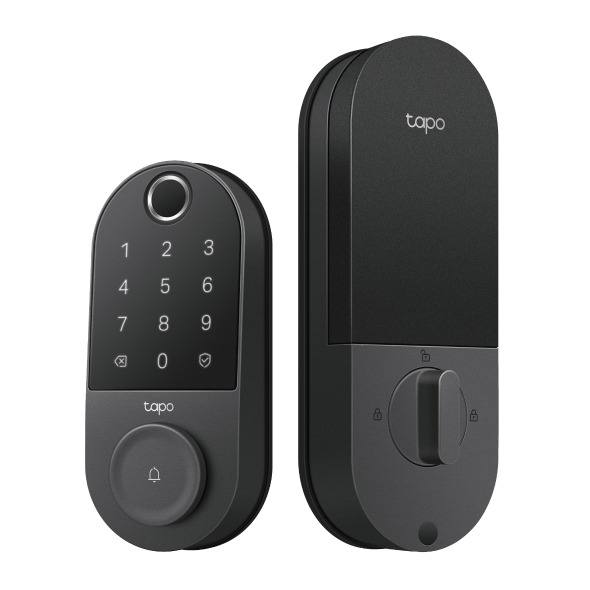
The Tapo DL110 is the right fit for busy households that want fingerprint access and front door awareness built into a single, durable device. It's a fingerprint deadbolt and a doorbell in one, so there's no second installation, no second app, and no second device to maintain.
When a visitor presses the doorbell, a notification goes straight to your phone. Whether you're upstairs, in the garden, or away from home entirely, you'll know someone is at the door. Combined with the activity log, which timestamps every lock and unlock, you have a running record of everyone who comes and goes, without having to piece it together from multiple sources.
The DL110 is a solid option for demanding installation spots. The IP65 weatherproofing rating means it's fully sealed against dust and handles direct water exposure from any direction, so it performs just as reliably through a wet winter or a scorching summer as it does on a mild day. BHMA Grade 2 certification backs that up with independently verified security and durability standards, confirming the lock is engineered to withstand the wear of daily entry over years of use.
The front door is the hardest-working entry point in most homes, and the DL110 is designed accordingly. The rechargeable battery lasts up to one year before needing attention, based on Tapo lab tests. When it does, the USB-C port makes recharging simple, so a low battery never means being locked out of your own home.
Tapo DL105: Best Overall Fingerprint Smart Lock
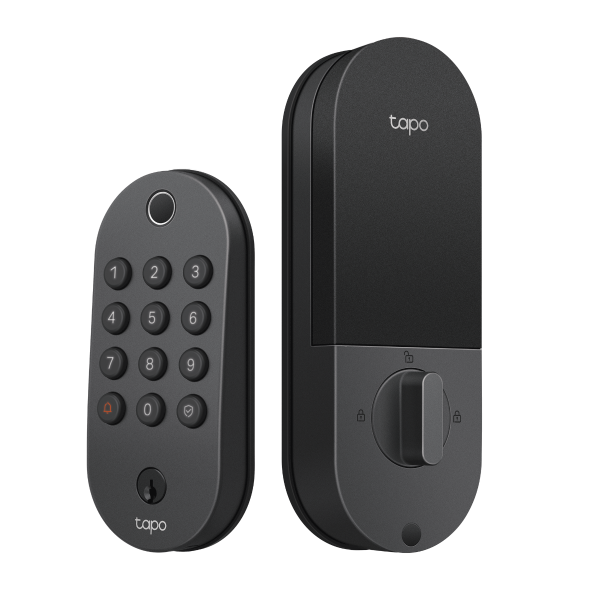
The Tapo DL105 is the straightforward choice for households that want reliable fingerprint entry and as little maintenance as possible. If your priority is a fast, dependable upgrade over physical keys, without extra complexity, the DL105 covers exactly that.
The 7,800mAh rechargeable battery lasts up to one year in Wi-Fi mode, according to Tapo testing, which means most households will charge it once and largely forget about it. For homes that don't need constant remote access, Bluetooth-only mode can stretch that runtime even further. When the battery does eventually need a top-up, USB-C charging makes it quick and straightforward, and the emergency power port ensures a low battery doesn't catch you off guard.
The DL105 is a practical fit for entry points that see regular daily use but aren't fully exposed to the elements, such as a covered front or side entrance, a garage door, or a sheltered back door, where reliable keyless access matters but extra features aren't a priority. The IP54 weatherproofing rating protects it against dust and splashing water, making it well-suited to partially covered or sheltered entryways. BHMA Grade 3 certification confirms it meets the security and durability standards for everyday residential use.
Tapo's Best Biometric Smart Locks at a Glance
|
Model |
Biometric Type |
Battery |
Weatherproofing |
Built-In Doorbell |
Best For |
|
Tapo DL130 |
DuoBiometric™ (palm + fingerprint) |
Dual-battery; 1 year+ per charge |
IP65 |
Yes |
Advanced biometric access; households with varied fingerprint needs |
|
Tapo DL110 |
Fingerprint |
1 year per charge |
IP65 |
Yes |
Biometric entry and exposed installation locations |
|
Tapo DL105 |
Fingerprint |
1 year per charge (Wi-Fi mode) |
IP54 |
No |
Reliable fingerprint entry with minimal maintenance |
Find Your Tapo Biometric Smart Lock
Tapo's biometric range covers every level of access. The DL105 delivers dependable fingerprint entry, a long-lasting battery, and a straightforward setup. The DL110 combines durability, high weather resistance, and biometric access. The DL130 brings DuoBiometric™ technology, combining palm vein and fingerprint recognition, for households that want the most advanced biometric front door lock in Tapo's lineup.
All three locks include core features with no subscription required: fingerprint access, app control, guest codes, activity logs, and real-time alerts from day one.
Explore the Tapo smart entry collection to compare models and find the right fit for your home.
Frequently Asked Questions
What is the best biometric door lock?
The best biometric door lock depends on what you need from your front door. For the most advanced lock in Tapo's range, the DL130 combines palm vein and fingerprint recognition in one device. For exposed outdoor installations, the DL110 offers fingerprint access and doorbell notifications. For straightforward fingerprint entry with a long-lasting battery, the DL105 is the low-maintenance choice.
What is the difference between fingerprint and palm recognition smart locks?
Fingerprint locks read the surface pattern of your fingertip and require contact with the sensor. Palm recognition locks use near-infrared light to scan the vein pattern beneath your palm, requiring no physical contact. Palm recognition works consistently regardless of skin condition, and the internal vein pattern is significantly harder to replicate than a surface fingerprint.
Are biometric door locks more secure than PIN code locks?
Biometric locks offer several advantages over PIN codes alone. A fingerprint or palm scan can't be shared accidentally, overheard, or forgotten the way a code can. Tapo biometric locks store biometric data encrypted on the device itself, never in the cloud, and automatically disable after repeated failed attempts. For households using a PIN, peek-proof passcode entry adds a deeper layer of protection against code guessing.
How many fingerprints can a Tapo smart lock store?
All three Tapo biometric smart locks, the DL130, DL110, and DL105, store up to 100 fingerprints. That's enough to register multiple fingers per household member and still have capacity for frequent guests.
Do Tapo biometric smart locks require a subscription?
No. Core features are included without a subscription on all Tapo biometric locks. Fingerprint access, app control, keypad entry, activity logs, real-time alerts, and guest code management are all available from the start. Optional Tapo Care plans are available for households that want extended cloud storage or additional features.
How many palm vein profiles can a Tapo lock store?
The Tapo DL130 stores up to 50 palm vein profiles. Combined with a capacity of 100 fingerprints, you have plenty of room to register household members and still accommodate frequent guests across both biometric methods.
How do you use palm vein unlocking on the Tapo DL130?
Hold your palm a few inches from the sensor on the exterior of the lock. The sensor uses near-infrared light to read your vein pattern and unlocks the door without any physical contact. You can register palm profiles through the Tapo app during setup, and add or remove them at any time