The Tapo Smart Lock Lineup: Every Type of Smart Lock Explained
Smart locks come in more varieties than most people expect: keypad, fingerprint, palm recognition, and now locks that combine multiple biometric methods in a single device. Understanding how different smart locks work makes choosing the right one much easier.
This guide walks through each type using the Tapo smart lock lineup as the example. By the end, you'll know how each lock works, who it suits, and where Tapo's range fits in.
Key Takeaways
- Five main types of smart locks: Keypad, fingerprint, palm recognition, DuoBiometric™, and app-based locks each verify identity differently and suit different household needs.
- Keypad locks use a PIN code for entry, making them easy to share access with multiple people.
- Fingerprint locks are faster and more personal than a keypad and are difficult to share or replicate.
- Palm recognition reads vein patterns beneath the skin using near-infrared light, delivering contactless access that works regardless of hand condition.
- DuoBiometric™ locks combine palm-vein and fingerprint recognition in one device, so you get both methods without choosing between them.
- All Tapo smart locks include core features and app management with no subscription required.
What Is a Smart Lock?
A smart lock replaces or retrofits your existing deadbolt and lets you manage entry via an app, keypad, fingerprint, or other access method, with no physical key required. The difference from a traditional lock is that access can be shared, adjusted, and monitored digitally.
You can create a temporary code for a guest, check whether your door is locked from your phone, or get a notification any time someone comes or goes. That's a lot more control than a traditional key ever gave you.
Types of Smart Locks
Smart locks come in several types, each using a different method to verify identity and grant access. Most smart locks support multiple access methods.
- Keypad smart locks unlock via a PIN code entered on a number pad.
- Biometric smart locks use a unique physical characteristic, such as a fingerprint or palm vein pattern, to verify identity and grant access.
- Fingerprint smart locks unlock via a registered fingerprint; faster and more secure than a PIN code.
- Palm recognition smart locks use near-infrared light to read the unique vein pattern beneath the skin of the palm; completely contactless.
- DuoBiometric™ smart locks combine palm vein and fingerprint recognition in a single device, offering both as complementary access methods.
- App-based smart locks are managed via a smartphone app, allowing remote locking, unlocking, and access management from anywhere.
Keypad Smart Locks
A keypad smart lock unlocks with a PIN code entered on a keypad, with no physical key required. It's a straightforward option for households that need to manage access for multiple people at once.
Sharing access is simple. You can set up individual codes for household members, a one-time code for a guest, or a scheduled code for a cleaner or dog walker. Most keypad locks also support peek-proof entry, where you type extra digits around your real code so anyone watching can't guess it.
The main limitation is that a PIN code doesn't verify who is using it. If someone shares a code or it gets observed, access is no longer exclusive. For many households, that's a fine trade-off; for those who want tighter access control, a biometric lock is worth considering.
A typical scenario where a keypart smart lock makes sense is a family with school-age kids who each need their own code, plus the ability to set up a weekly access window for a cleaner without handing over a key.
Fingerprint Smart Locks
A fingerprint smart lock unlocks via a registered fingerprint. It's faster than a keypad and more secure, because the access method is personal to the individual and difficult to pass along.
Most fingerprint locks store multiple registered prints, so each household member gets their own access without sharing or copying.
The main limitation is that fingerprint recognition can occasionally struggle with wet, dirty, or worn fingertips. Most fingerprint locks include a keypad or a physical key as a backup, so you're not stuck at the door if the sensor has trouble reading your fingerprint.
This type of lock works well for a busy household that wants fast, hands-free entry and doesn't want to share a PIN code that could be passed on.
Palm Recognition Smart Locks
A palm recognition smart lock uses near-infrared light to read the unique vein pattern beneath the skin of your palm. No contact with the sensor is required, making it completely contactless.
Because the vein pattern sits beneath the skin, it cannot be lifted or copied the way a surface fingerprint can. It also reads reliably regardless of hand condition: wet, dry, or rough skin doesn't affect accuracy. Palm vein patterns stay consistent over time too, which makes these types of smart door locks a reliable option for every household member, including young children and older adults.
A household that wants the most seamless entry experience might consider a palm recognition smart lock. The lock reads the palm as the hand approaches, with no pressing or entering required.
DuoBiometric™ Smart Locks
A DuoBiometric™ smart lock combines palm vein and fingerprint recognition in a single device, so you get both without having to pick one.
Palm recognition works as the primary everyday method: contactless, fast, and accurate. Fingerprint access is there as a reliable backup when palm recognition is less convenient. A household where one person prefers the hands-free nature of palm access and another relies on fingerprint access can both use the same lock, each using their preferred method.
This represents the most advanced consumer biometric access available in the Tapo lineup. You don't have to choose between two strong access methods because the lock includes both.
App-Based and Remote Access Smart Locks
Every smart lock in this article supports app management, but app-based remote access goes beyond setup. With Wi-Fi enabled, you can lock or unlock your door from anywhere, receive real-time activity notifications, and grant a guest temporary access even when you're not home.
Remote access is one of the smart lock features available on every model in the Tapo range, and it works as a layer on top of whichever primary access method the lock uses: keypad, fingerprint, or palm. It's useful for households that regularly receive deliveries, have guests arriving at varying times, or want to check door status without leaving what they're doing.
Activity logs give you a record of every lock and unlock event, with timestamps, so you can always see who accessed your home and when.
Smart Lock Types at a Glance
A quick smart lock comparison across all types, with the Tapo model that best represents each. All Tapo smart locks include core features with no subscription required.
|
Lock Type |
How It Works |
Access Method |
Best For |
Tapo Model |
|
Keypad |
PIN code entered on a number pad |
Keypad code |
Households managing access for multiple people or guests |
DL100 |
|
Fingerprint |
Registered fingerprint scanned at the sensor |
Touch sensor |
Households wanting fast, personal biometric entry |
DL105, DL110 |
|
Palm Recognition |
Near-infrared scan of palm vein pattern |
Contactless palm |
Households wanting accurate, hands-free biometric access |
DL130 |
|
DuoBiometric™ |
Palm vein and fingerprint in one device |
Palm or fingerprint |
Households wanting advanced biometric access with built-in flexibility |
DL130 |
|
App-Based Remote Access |
Lock, unlock, and manage via smartphone app over Wi-Fi |
App, Bluetooth |
Any household wanting remote access and guest management |
All models |
How to Choose the Right Type of Smart Lock
A few practical questions can point you toward the right fit.
How many people need access?
A household with young kids, occasional guests, or regular service providers benefits from keypad access: individual codes are easy to set up and update at any time. If most household members want personal biometric access, a fingerprint or DuoBiometric™ lock gives each person their own registered method.
Do you have short-term guests or manage a rental?
Keypad locks work well here. Temporary and one-time codes are easy to create, and scheduled codes can be set to work only during specific time windows, keeping things straightforward for guests without compromising security after they leave.
Do you need to manage access remotely?
App-based remote access, available across the Tapo smart lock range, lets you create and revoke codes from your phone, check the activity log, and lock or unlock the door from anywhere. That's valuable for any household where access needs change regularly.
How much does entry speed matter?
Keypad entry is simple and reliable. Fingerprint access is faster and more personal. Palm recognition is the most seamless option, since the lock reads your hand as you approach.
Is biometric access a priority?
DuoBiometric™ locks include both palm vein and fingerprint recognition, so you don't have to commit to just one method. Different household members can use whichever works best for them.
The best smart locks for most households offer multiple access methods, so there's always a backup if one isn't convenient. Knowing how to choose a smart lock comes down to your household's daily routines, not just the spec sheet.
The Tapo Smart Lock Lineup
The Tapo range includes a model for every type of smart lock covered in this guide.
Tapo DL130: DuoBiometric™ Smart Lock (NEW for 2026)
The Tapo DL130 is the most advanced lock in the Tapo lineup and the only model that combines palm-vein and fingerprint recognition with DuoBiometric™ technology.
Palm recognition is the primary everyday access method. Hold your hand near the sensor and the lock reads your unique vein pattern with no touching required. The DL130 scans with 99% accuracy under typical conditions and works reliably regardless of hand condition. Fingerprint recognition is always available as a backup, so if palm access isn't convenient at any moment, your fingerprint gets you in.
Power is handled by a dual-battery system designed for uninterrupted access. When the main battery is removed for charging, a built-in backup cell keeps the lock running. Once the main battery is reinstalled, it can recharge the backup cell automatically. There are no disposable batteries, and one charge lasts over a year based on typical usage. You can monitor battery levels anytime in the Tapo app.
The DL130 supports seven unlock methods in total: palm recognition, fingerprint, keypad, the Tapo app via Wi-Fi or Bluetooth, voice assistant control, and physical key backup. Biometric data is stored locally on the device with AES-128 encryption and never sent to the cloud. The included door sensor enables auto-lock, so the door secures itself after each entry. The DL130 is IP65 rated for year-round weather protection and works with Amazon Alexa, Google Home, and Samsung SmartThings.
Tapo DL110: Fingerprint Smart Lock with Built-In Doorbell
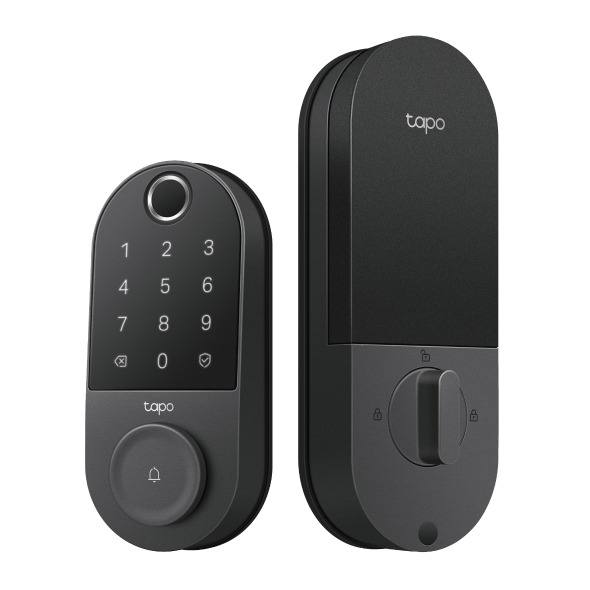
The Tapo DL110 combines fingerprint access with a built-in doorbell, putting biometric entry and visitor management into one device at your front door.
The fingerprint sensor stores up to 100 registered prints and is built for quick, reliable recognition. Six access methods are supported: fingerprint, keypad, Tapo app, Bluetooth, voice assistant, and physical key. The DL110 runs on a rechargeable battery rated for up to one year under typical usage, with a USB-C port for emergency power if the battery runs low. BHMA (Builders Hardware Manufacturers Association) Grade 2 certification means the lock has been independently tested to meet residential security and durability standards, and it is IP65 rated for outdoor durability. The DL110 works with Amazon Alexa, Google Home, and Samsung SmartThings.
Tapo DL105: Fingerprint Smart Lock
The Tapo DL105 is a fingerprint smart lock designed for reliable, low-maintenance everyday entry. It stores up to 100 fingerprints and supports six access methods: fingerprint, keypad, Tapo app, Bluetooth, voice assistant, and physical key.
The rechargeable battery is rated for up to one year of use in Wi-Fi mode under typical conditions. Switching to Bluetooth-only mode can extend that, making the DL105 a strong option for households that want to reduce how often they think about maintenance. It includes a built-in doorbell, auto-lock, peek-proof passcode entry, and real-time activity alerts. The DL105 is IP54 rated and works with Amazon Alexa, Google Home, and Samsung SmartThings.
Tapo DL100: Keypad Smart Lock
The Tapo DL100 is Tapo's keypad smart lock, built for households that want reliable PIN-based entry without biometric features.
It supports up to 200 customizable codes: permanent codes for household members, one-time codes for guests, and scheduled codes for regular visitors such as cleaners or dog walkers. Peek-proof entry lets you type extra digits around your real code for added security. The DL100 runs on four AA batteries, with up to seven months of battery life in Wi-Fi mode or up to 10 months in Bluetooth mode under typical use, and includes a USB-C port for emergency power.
This lock has BHMA Grade 3 certification, is IP54 rated for protection against dust and water splashes, and works with Amazon Alexa, Google Home, and Samsung SmartThings.
Types of Tapo Smart Locks
A quick-reference comparison of the full Tapo smart lock range. All models include core features with no subscription required.
|
Model |
Lock Type |
Access Methods |
Best For |
Battery Life |
|
DL130 |
DuoBiometric™ |
Palm vein, fingerprint, keypad, app, Bluetooth, voice, physical key |
The most advanced biometric access in the lineup |
Rechargeable (up to 1 year, typical use) |
|
DL110 |
Fingerprint with doorbell |
Fingerprint, keypad, app, Bluetooth, voice, physical key |
Biometric entry and visitor management in one device |
Rechargeable, up to 1 year (typical use) |
|
DL105 |
Fingerprint |
Fingerprint, keypad, app, Bluetooth, voice, physical key |
Long-lasting fingerprint access with minimal maintenance |
Rechargeable, up to 1 year Wi-Fi / 2 years Bluetooth (typical use) |
|
DL100 |
Keypad |
Keypad, app, Bluetooth, voice, physical key |
Keypad access at a BHMA Grade 3 certified security standard |
AA batteries, up to 7 months Wi-Fi / 10 months Bluetooth (typical use) |
Find the Right Smart Lock for Your Home
By now you've got a clear picture of what each lock type does and who it suits best. Keypad locks are flexible and easy to manage for households with multiple people or frequent guests. Fingerprint locks offer fast, personal entry that's harder to share. Palm recognition adds fully contactless biometric access. DuoBiometric™ locks bring both palm and fingerprint into one device.
Every model in the Tapo smart lock range supports app management, remote access, and activity logging without a monthly subscription. Tapo has also signed the Cybersecurity and Infrastructure Security Agency (CISA) Secure by Design pledge, meaning security is built into every product from the start, not added as an afterthought.
If you're working through a smart lock buying guide and want to see all the options side by side, the Tapo smart entry collection has every model with full specs and details to help you compare.
Frequently Asked Questions
What are the different types of smart locks?
The main types of smart locks are keypad, fingerprint, palm recognition, DuoBiometric™, and app-based. Keypad locks use a PIN code; fingerprint locks read a registered print; palm recognition locks scan the vein pattern beneath the skin without any contact; and DuoBiometric™ locks offer both palm and fingerprint in one device. Most smart locks also support app-based access for remote management.
What is the most secure type of smart lock?
DuoBiometric™ smart locks offer the most advanced biometric access, combining palm-vein recognition and fingerprint recognition in a single device. Palm vein patterns are read from beneath the skin and are difficult to replicate. Across all types, features like AES encryption, activity logging, auto-lock, and lockout after failed attempts contribute meaningfully to security.
Can smart locks be used without a smartphone?
Yes. Keypad, fingerprint, and palm recognition access all work without a smartphone present. Physical key backup is standard on all Tapo smart locks. A phone and the Tapo app are needed for initial setup and to use remote access features, but they aren't required for everyday entry.
Do all smart locks require a subscription?
No. All Tapo smart locks include core features without a subscription. App control, remote access, activity logs, auto-lock, and access code management are all included at no ongoing cost.
What is the difference between a keypad and a fingerprint smart lock?
A keypad lock grants access via a PIN code, which anyone who knows the code can use. A fingerprint lock grants access via a registered fingerprint tied to a specific person, making it harder to share or replicate. Keypad locks are generally easier to manage for temporary or guest access; fingerprint locks are better suited to households that want individual, non-transferable entry.

_normal_20260325125546g.png)