Best DIY Home Security Systems with No Monthly Fee 2026 │ Tapo
Most "DIY" home security systems aren't as independent as they sound. Many still require a monthly subscription to unlock core features like AI alerts, cloud storage, or remote access. If you're looking for the best DIY home security system with no monthly fee, no contract, and no professional installation required, Tapo's ecosystem can meet your needs.
Every system in this guide is fully DIY-installed and self-monitored. All core features such as AI detection, local storage, smart alerts, and app control are included without a subscription. You choose your components, set everything up yourself, and manage it all from the Tapo app.
Key Takeaways
- The best DIY home security system with no monthly fee starts with the essentials: a smart hub, outdoor cameras, door and window sensors, and app-based self-monitoring. Tapo brings all of it together in one expandable ecosystem with no subscription required.
- The Tapo H500 is the best overall pick for a complete DIY system: it connects up to 16 cameras and 64 sensors, stores footage locally with no subscription required, and adds facial recognition to existing Tapo cameras.
- The Tapo H200 starter kit is the best affordable option for first-time buyers: it connects up to 64 IoT devices plus up to four Tapo cameras or video doorbells, with a built-in alarm and no monthly fees.
- The Tapo C425 wire-free camera is the best option for renters or anyone who wants maximum placement flexibility: no drilling, up to 300 days of battery life, and fully wireless installation.
- Every Tapo DIY system is self-monitored through the Tapo app: no contract, no ongoing fees, and no professional installation required.
What Makes a Great DIY Home Security System?
When comparing DIY security system options, four things determine whether a setup fits your home, lifestyle, and budget.
Easy DIY-installation
A true DIY home security system should not require professional help. Look for systems that include all mounting hardware, use peel-and-stick sensors for door and window coverage, and walk you through setup in a mobile app. Installation time should be measured in minutes, not hours.
No mandatory subscription
Many systems may advertise DIY setup but lock essential features like AI detection, real-time alerts, or cloud storage behind a monthly fee. A useful subscription-free system gives you full functionality from the start. Tapo includes AI-powered detection, motion alerts, and local storage without requiring a paid plan.
Smart detection included for free
AI-powered detection that distinguishes people, vehicles, and pets from general motion helps reduce false alerts. When this feature requires an add-on subscription, it adds up quickly. In Tapo's product range, AI detection is included at no extra cost.
Scalability without starting over
A good DIY system grows with you. You should be able to start with a basic setup and add cameras, sensors, or a smart lock later without replacing your hub or switching apps. Tapo's ecosystem was created with this kind of modular expansion in mind.
How to Build a DIY Home Security System
A great DIY-install home security setup starts with a hub. A smart home security hub is the central device that connects your cameras, sensors, and doorbells so they can communicate with each other and be managed in one place. Without a hub, your devices work independently and can't trigger coordinated responses like turning on lights when a sensor detects motion.
Once your hub is set up, you manage everything through the Tapo app: checking live camera feeds, reviewing motion alerts, setting up automations, and getting push notifications when something happens. The app is how you self-monitor your home from anywhere.
From there, you can build out your system with the components that fit your situation:
- Outdoor cameras for perimeter coverage and motion alerts
- Indoor cameras for interior monitoring
- Video doorbell for front-door visibility and two-way audio
- Door and window sensors to detect when entry points open or close
- Motion sensors for interior or perimeter detection
- Smart lock for keyless entry and remote access control
- Water leak sensor for kitchen, bathroom, or laundry room protection
- Temperature and humidity sensor for climate monitoring
You don't need all of these at once. Most homeowners start with a hub, a camera or two, and a set of door sensors, then expand from there.
The Best Tapo DIY Home Security Systems in 2026
Every system listed below installs without professional help, requires no monthly fee, and works together through the Tapo app for self-monitoring. You choose the components you need now, then add more later if needed.
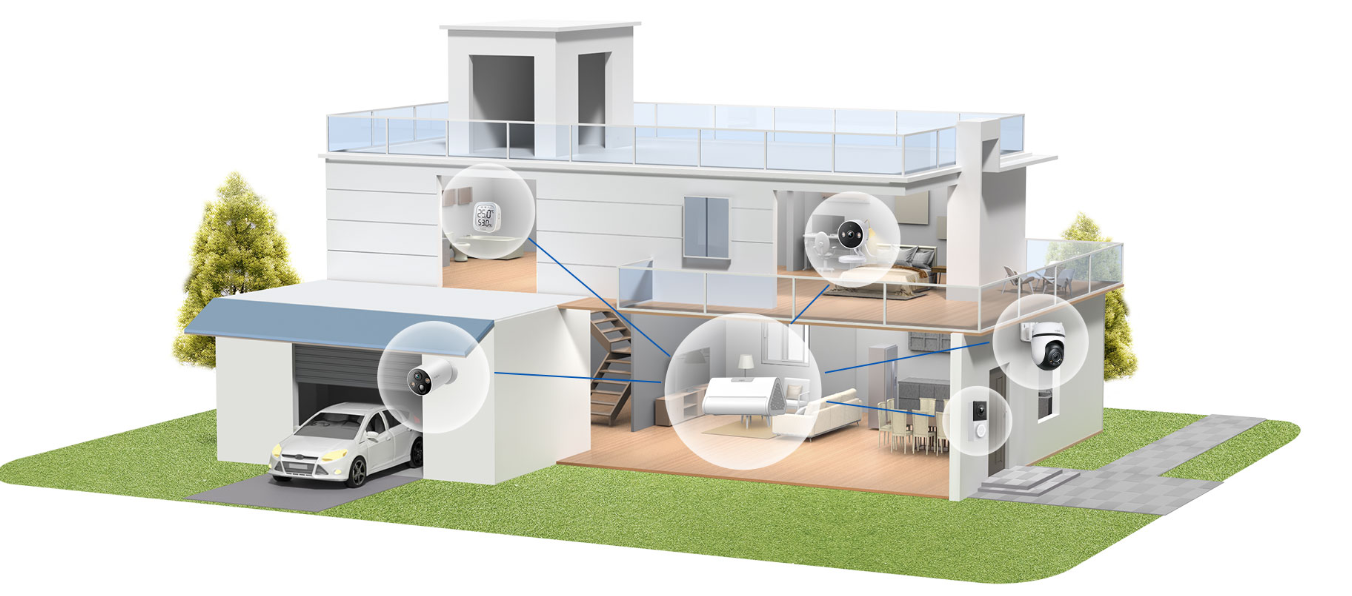
Best Overall DIY System: Tapo H500 + Camera + Sensor Bundle
For homeowners who want a complete, scalable DIY security system with no ongoing costs, the Tapo H500 CentralHub is the best starting point.
The H500 connects up to 16 Tapo cameras and 64 Sub-G sensors, and stores footage locally with no subscription required. It comes with 16GB of built-in storage, expandable to 16TB with an external hard drive: enough to hold months or even years of recorded video clips. A DIY security system built around the H500 is the best option for homeowners who want to avoid individual microSD cards in every camera and skip cloud storage fees entirely.
The H500 also adds facial recognition to your existing Tapo cameras. It learns to recognize familiar faces and alerts you only when strangers are detected, reducing unnecessary notifications. A built-in 110dB alarm doubles as a deterrent siren and can function as a doorbell chime when paired with Tapo smart doorbells. You can monitor up to four live camera views simultaneously on a larger screen using the built-in HDMI port, or manage everything from the Tapo app on your phone.
Ideal for: Homeowners who want a complete, scalable DIY security system with no ongoing costs.
What to pair with it: Tapo outdoor cameras, Tapo T110 door and window sensors, Tapo T100 motion sensors.
Best Affordable DIY Home Security System: Tapo H200 + T110 + T100 Starter Kit
If you're new to smart home security and want to start simple, the Tapo H200 hub paired with a few sensors is one of the most affordable home security systems you can build yourself, with no monthly fee.
The H200 connects up to 64 IoT devices (sensors, buttons, and Sub-1G switches) plus up to four Tapo cameras or video doorbells, making it a capable hub with plenty of room to expand. Currently supported cameras include the Tapo C420, C400, and D230, with more models on the way.
Pair it with the Tapo T110 Smart Contact Sensor to monitor doors, windows, cabinets, or even a mailbox in real time — you get instant app notifications the moment something opens or closes. Add the Tapo T100 Smart Motion Sensor for interior motion coverage, with adjustable sensitivity and detection up to 23 feet. Both sensors are battery-powered and last up to two years, so the system is super low maintenance.
The H200 includes a built-in 90dB alarm and 19 ringtone options, so it doubles as a chime when a visitor arrives at a connected doorbell. Local microSD storage (up to 512GB, sold separately) keeps your footage on-site without a cloud subscription. Voice control works with Amazon Alexa and Google Home.
Ideal for: First-time buyers who want to start small and expand later without breaking their budget.
What to pair with it: Tapo T110 contact sensors, Tapo T100 motion sensors, and the Tapo D205 video doorbell when you're ready to expand.
Best Wireless DIY System: Tapo C425 + H200 + Sensors
For renters, or anyone who wants maximum placement flexibility without drilling or running cables, the Tapo C425 is the centerpiece of the best DIY wireless home security system in Tapo's lineup.
The C425 is 100% wire-free, with a magnetic base that lets you mount, remove, and reposition it without tools. Its 10,000mAh battery provides up to 300 days of performance on a single charge. That means fewer interruptions and less time thinking about maintenance. The C425 shoots in 2K QHD resolution, sharp enough to make out faces and license plates, and includes color night vision through built-in spotlights and a starlight sensor, so you get clear, detailed footage in low-light conditions. A 142° super-wide field of view covers more ground per camera, and IP66 weatherproofing protects it in outdoor conditions year-round.
Pair the C425 with the H200 hub to integrate sensors and local storage into your wireless system. The hub connects the sensors, coordinates alerts, and stores video from the doorbell, keeping everything managed through a single app with no subscription required.
Ideal for: Renters or homeowners who want maximum placement flexibility and a wire-free setup.
Available in multipacks for broader coverage without starting over from scratch.
Best DIY System With Smart Lock: Tapo H500 + DL110 + Cameras
If you want full entry control as part of your DIY security setup, adding a smart lock to your Tapo system brings keyless access, remote locking, and real-time entry alerts under the same app as your cameras and sensors.
The Tapo DL110 Smart Wi-Fi Door Lock offers six ways to unlock: through the Tapo app, by fingerprint, Bluetooth, keypad code, voice assistant, or with included backup keys. It recognizes and stores up to 100 fingerprints and unlocks in seconds. Battery life runs up to one year before recharging, and a built-in USB-C port makes topping it up straightforward.
The DL110 works with Alexa, Google Home, and Samsung SmartThings for hands-free control. It also auto-locks after multiple failed PIN or fingerprint attempts and sends real-time alerts to flag suspicious activity. An IP65 rating means it holds up in outdoor conditions through changing weather.
Pairing the DL110 with the H500 hub and Tapo cameras gives you a complete entry-point setup: see who arrives on camera, get a notification, and lock or unlock remotely, all from one app with no monthly fee.
Ideal for: Homeowners who want full entry control as part of their complete DIY security system.
How Easy Is It to Set Up a Tapo DIY Security System?
The setup process is designed to work without any technical background. Unbox your devices, download the Tapo app, and follow the in-app setup guide, which walks through each device step by step. Sensors like the T110 and T100 attach using the included 3M adhesive so there’s no drilling or tools necessary. Most installs take just a few minutes per device.
Cameras like the C425 use a magnetic base that sticks or screws to a surface, depending on your preference. The included hardware covers both options. There is no need to schedule a technician or run cables through walls. The Tapo app confirms each device as it connects, so you can see at a glance when your system is ready.
The biggest concern for most first-time buyers is compatibility: will this work with what I already have? Every Tapo system connects through the Tapo app. Devices from the same ecosystem work together automatically, and hubs, sensors, cameras, and doorbells can be added to the same system over time. Once your system is set up, you'll also want to think about how you plan to monitor it.
Self-Monitoring vs. Professional Monitoring
If you’re comparing options, you may be wondering whether self-monitoring is enough or if professional monitoring is worth paying for.
When you hire a professional monitoring service, a third-party team receives your security alerts and can contact emergency services on your behalf if you don't respond. That adds a layer of response time in situations where you might miss a notification. For that coverage, most providers charge a monthly fee.
Self-monitoring through Tapo means you receive push notifications directly to your phone when motion is detected, a sensor triggers, or a camera picks up activity. The Tapo app lets you review footage, check live feeds, and assess the situation yourself before deciding to call for help. A DIY alarm system built on Tapo's lineup also includes a built-in hub siren — up to 110dB on the H500 — which can deter and alert on its own.
For most homeowners searching for a DIY alarm system, self-monitoring covers the same ground. You stay in control, there are no contracts, and there are no monthly fees. The main trade-off to consider is that if an alert comes through while you're unavailable, follow-up is in your hands. That’s true of any self-monitored setup, and simply something to keep in mind as you decide what works best for you.
Building Your Tapo System: What You Need to Know
If you're ready to put together a DIY home security system with no monthly fee, here's how to think about building your setup from the ground up.
Start with the hub
The hub is the foundation. Choose the Tapo H200 if you're starting small and want an affordable, expandable entry point. Choose the Tapo H500 if you want a full system with local storage for multiple cameras, facial recognition, and room to scale up to 16 cameras and 64 sensors.
Add outdoor cameras
One or two outdoor cameras covering your main entry points give you visual coverage and motion alerts. The wire-free Tapo C425 is a strong choice for placement flexibility. For front-door coverage, the Tapo D205 video doorbell adds a 2K view, two-way audio, and visitor alerts with up to 180 days of battery life.
Cover your entry points with sensors
Door and window sensors are an efficient way to monitor every entry point in your home. The Tapo T110 attaches with 3M adhesive and sends an instant notification whenever a covered door or window opens. Note that Tapo sensors require a compatible hub to operate: they do not connect directly to cameras or Wi-Fi on their own.
Add protection where it matters most
Motion sensors like the T100 add interior coverage. For full entry control, the Tapo DL110 Smart Wi-Fi Door Lock adds keyless access and remote locking, all managed through the same Tapo app as your cameras and sensors. If flooding is a concern, the Tapo T300 water leak sensor monitors for drips and leaks with six detection probes and sends immediate alerts through the app.
A strong starter setup
The best equation for getting started: H200 hub + one outdoor camera + two T110 door sensors. This setup covers your main entry points, provides motion-triggered alerts, and costs a fraction of a professionally monitored system, with no monthly fee and no contract.
Build the Home Security Setup That Works for You
The best DIY home security system is one you can install yourself, customize to your home, and monitor on your own terms, without a monthly bill or a long-term contract. Tapo's product lineup removes every barrier: no technician required, no subscription needed, and no ongoing fees for features you can rely on.
For most homeowners, the H500 bundle is the complete solution: scalable, locally stored, and packed with free AI features. For first-time buyers, the H200 starter kit is the lowest-effort way to build real coverage and expand over time. Either way, you're in control.
Explore the full range of Tapo smart security devices to find the setup that fits your home.
Frequently Asked Questions
Are DIY home security systems good?
Yes, DIY home security systems are an effective and practical option for most homeowners. Modern DIY systems include the same core features as professionally installed setups such as motion detection, video monitoring, real-time alerts, and smart sensors, without requiring a technician or a long-term contract. The key is choosing a system built around a smart hub that connects all your devices, so cameras, sensors, and alarms work together rather than as separate products.
What is the best home security system that doesn't require a subscription?
Tapo's DIY home security systems are designed to work fully without a subscription. All core features, including AI-powered motion detection, local video storage, real-time app alerts, and sensor integration, are included at no extra cost. The Tapo H500 hub stores footage from up to 16 cameras locally with no monthly fee, and the H200 hub is a strong no-subscription starting point for smaller setups. You can add Tapo Care cloud storage as an optional upgrade, but no subscription is required to use the system.
What is considered the best home security system?
The best home security system is one that fits your home, your lifestyle, and your budget. For homeowners who want to avoid monthly fees, a DIY system that includes a smart hub, outdoor cameras, entry sensors, and app-based self-monitoring covers the core bases. For those who want professional backup, monitored systems add a response layer. The right answer depends on how much you want to manage yourself and whether you're comfortable responding to alerts directly.
What do police recommend for home security?
Law enforcement agencies generally recommend a layered approach to home security: securing entry points with quality locks, making your home visible and well-lit, and using cameras and sensors that can deter and document activity. Visible cameras at entry points, motion-triggered lighting, and door and window sensors on every accessible point are commonly cited as effective deterrents. A smart doorbell with two-way audio adds the ability to respond to visitors remotely, which can prevent situations from escalating.


