What Is Palm Vein Scanning? The Future of Smart Lock Access Explained
Your front door is getting smarter. Palm vein recognition is now available in consumer smart locks, bringing a level of biometric security once reserved for corporate and commercial settings into everyday home access.
Palm vein scanning is part of the same family of biometric technology as fingerprint scanning, facial recognition, and iris scanning. Each method verifies identity using unique physical characteristics. Palm vein recognition takes that a step further by reading the vein pattern beneath your skin, completely contactless, with no pressing or touching required.
This article explains what a palm vein scan is, how it works, how it compares to a fingerprint scan, and what it means for smart home access.
Key Takeaways
- Palm vein scanning is a biometric identification method. It uses near-infrared light to map the unique vein pattern beneath the skin of the palm.
- It’s a highly accurate method of identity verification. Every person has a unique vein pattern.
- Because the vein pattern is located beneath the skin, it’s more secure than some other ID methods. There is nothing on the surface to photograph, lift, or replicate.
- Palm vein recognition is completely contactless. The lock reads the palm as the hand approaches.
- The Tapo DL130 smart lock offers palm-vein and fingerprint access. Tapo’s DuoBiometric technology brings both methods together in a single device.
What Is a Palm Vein Scan?
Palm vein scanning is a biometric method that uses near-infrared light to map the unique pattern of veins beneath the skin of the palm. Because no two people share the same vein pattern, not even identical twins, it is a highly accurate and secure way to verify identity.
Unlike fingerprints, the data used is entirely internal to the body. The vein pattern is below the surface of the skin, invisible to the naked eye, and can’t be captured from a physical trace left on an object.
How Does Palm Vein Scanning Work?
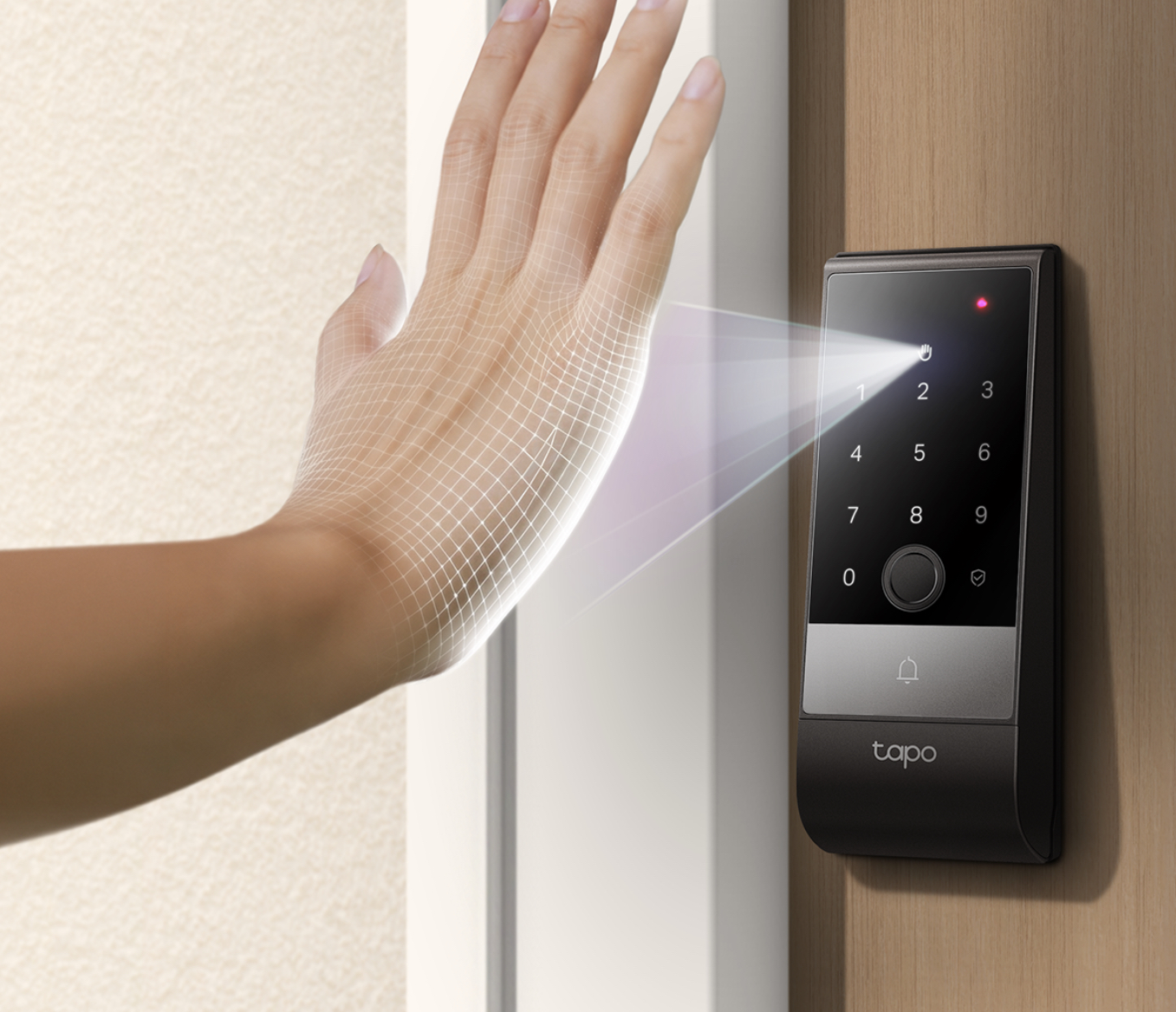
"The process uses near-infrared light to record the vein structure beneath the skin. Here’s how.
- The scanner emits near-infrared light toward the palm.
- The light passes through the skin and is absorbed by the hemoglobin in the blood as it moves through the veins.
- The veins appear as a distinct dark pattern against the surrounding tissue, creating a unique vein map.
- That map is converted into an encrypted digital template and stored on the device. This means your biometric data stays on the lock, not sent to the cloud.
- On each use, a new scan is compared against the stored template to grant or deny access.
Palm Vein Recognition in Smart Locks: What It Means for Your Front Door
Getting into your home should be effortless. Palm vein recognition makes it so: the lock reads the unique vein pattern beneath your palm as your hand approaches, with no contact required. You can walk up to your door and have it unlocked without stopping to press or touch anything.
The contactless scan works regardless of whether your hands are wet, dirty, or your arms are full of groceries. There's nothing to wipe, press, or reposition. The lock simply responds as you reach for it.
Because vein patterns form beneath the skin, they are significantly harder to copy than surface biometrics like fingerprints, giving you a more secure foundation for everyday access.
Palm Vein vs. Fingerprint: How Do They Compare?
Both palm vein and fingerprint recognition are biometric access methods, and both are significantly more secure than PIN codes or physical keys. They work differently, though, and those differences matter when choosing a smart lock.
Here is a side-by-side comparison.
|
Feature |
Palm Vein |
Fingerprint |
|
How it works |
Near-infrared light maps veins beneath the skin |
Optical or capacitive sensor reads surface ridge patterns |
|
Contact required |
No, it’s fully contactless |
Yes, finger must press the sensor |
|
Where data is stored |
Encrypted template on device |
Encrypted template on device |
|
Difficulty to replicate |
Very difficult. It’s internal, invisible, and requires live tissue |
Moderately difficult. Surface pattern can potentially be lifted |
|
Affected by skin conditions, dirt, or sweat |
No, it reads beneath the skin |
Yes, any cuts, dirt, or moisture can affect accuracy |
|
Consumer availability |
Emerging in select smart locks |
Widely available |
Why Is Palm Vein Recognition More Secure Than Fingerprint?
Palm vein authentication relies on data that is entirely internal to the body; a palm vein pattern leaves no trace on anything you touch and cannot be copied from the outside. A fingerprint, by contrast, is a surface feature that can potentially be lifted from objects and copied.
Modern palm vein sensors add another layer of protection: they require live tissue. The scanner detects active blood flow, not just a static pattern, which makes spoofing extremely difficult.
Fingerprint sensors can also be affected by dry skin, minor cuts, or moisture. Palm vein scanners read beneath the skin, so surface conditions have no effect on accuracy.
Tapo's Top Picks: Palm Vein and Fingerprint Smart Locks
Tapo offers biometric smart lock options for both palm vein and fingerprint access, with no subscription required for core features. Here are the top picks for each.
Tapo DL130: Top Pick for Palm Vein Access
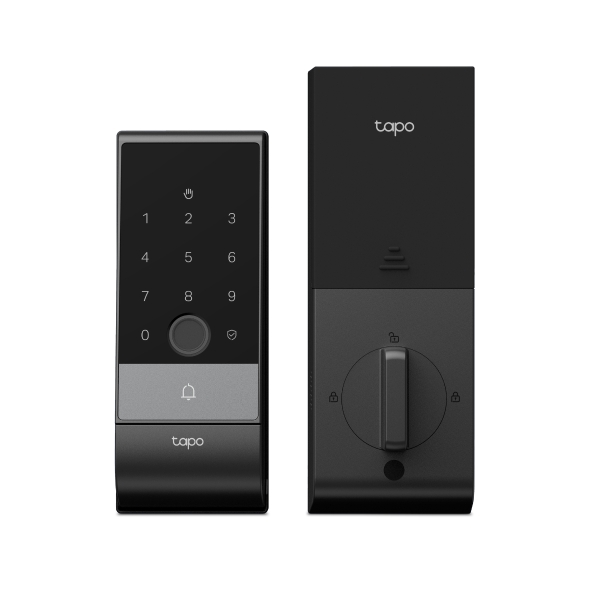
The Tapo DL130 lets you walk up to your front door and unlock it without touching anything. It combines palm vein recognition with fingerprint access in a single device, giving you two biometric options where most locks offer one. Tapo calls this DuoBiometric. Palm vein works as the primary, hands-free method, with fingerprint built in as a reliable backup.
When you need to share access, the DL130 supports six ways to unlock: palm, fingerprint, passcode, app, voice, or physical key. It stores up to 50 palm records, 100 fingerprints, and 200 passcodes, so the whole household is covered without workarounds. All biometric data stays stored locally inside the lock, not in the cloud.
For reliability, the DL130 includes a dual battery system with USB-C emergency power (cable included) and a built-in door sensor that triggers auto-lock. It carries a BHMA Grade 2 rating and IP65 weather protection, and connects over dual-band Wi-Fi (2.4/5 GHz). It works with Amazon Alexa, Google Home (streaming via Google limited to display on Chromecast and Nest devices), and Samsung SmartThings. Check product specifications for compatibility. Real-time notifications and activity logs are accessible through the Tapo app.
Tapo DL110: Top Pick for Fingerprint Access
The Tapo DL110 lets you into your home in under 0.5 seconds with a fingerprint scan, with no keys or codes required. It stores up to 100 fingerprints and includes a built-in doorbell, giving you biometric access and visitor alerts in a single device. That's one installation instead of two for households that want both at the front door.
When you need more flexibility, the DL110 supports six ways to unlock: fingerprint, app, Bluetooth, keypad, voice assistant, or physical key. Peek-proof passcode entry lets you add decoy digits before or after your real code, and scheduled or one-time passcodes make it easy to manage access for housekeepers, dog walkers, or guests. If someone enters the wrong code or fingerprint too many times, the keypad and sensor lock out automatically and your phone gets an alert.
For day-to-day reliability, the DL110 runs on a removable, rechargeable battery rated for up to one year between charges under typical conditions, with a USB-C port for emergency power. It carries an IP65 weatherproof rating and BHMA Grade 2 certification. It connects over Wi-Fi and is compatible with Amazon Alexa, Google Home (streaming via Google limited to display on Chromecast and Nest devices), and Samsung SmartThings. Check product specifications for compatibility.
For doors in covered or sheltered entryways, the Tapo DL105 offers the same six-way access setup and up to one-year battery life under typical conditions, with USB-C charging. Its IP54 rating makes it well-suited for protected installations where full weather exposure isn't a concern.
The Next Step in Smart Home Access
Palm vein recognition is no longer just for banks and airports. It's at your front door now.
The Tapo DL130 combines palm-vein and fingerprint recognition into a single device. With Tapo’s DuoBiometric technology, you get completely contactless palm vein entry as your primary access method and fingerprint as a dependable backup, with no subscription required for core features.
Explore Tapo's full smart entry collection to find the right fit for your home.
Frequently Asked Questions
What is a palm vein scan?
A palm vein scan is a biometric identification method that uses near-infrared light to map the unique pattern of veins beneath the skin of the palm. Because vein patterns are internal and unique to each person, they provide a highly accurate and secure way to verify identity without any physical contact.
How does palm vein recognition work?
A palm vein scanner emits near-infrared light that passes through the skin and is absorbed by the hemoglobin in the veins. The resulting pattern is captured as a unique vein map, converted into an encrypted digital template, and stored on the device. Each time you use it, a new scan is compared against the stored template to confirm your identity.
Is palm vein scanning more secure than fingerprint?
Yes. Palm vein data is located beneath the skin, so it cannot be photographed, lifted from a surface, or replicated the way a fingerprint can. Modern palm vein sensors also detect active blood flow rather than a static pattern, making them significantly harder to spoof.
Can palm vein recognition be fooled or spoofed?
It is very difficult to fool. The scanner reads the vein pattern beneath your skin and checks for active blood flow, so it needs a real, living hand to work. A photo or a replica of someone's hand won't trigger it.
Which Tapo smart lock uses palm vein recognition?
The Tapo DL130 is the only Tapo smart lock with palm vein recognition. It uses DuoBiometric technology to combine palm vein and fingerprint access in a single device, with no subscription required for core features.
