What should I do if I don’t receive the verification email for TP-Link ID registration or password reset?
Recent updates may have expanded access to feature(s) discussed in this FAQ. Visit your product's support page, select the correct hardware version for your device, and check either the Datasheet or the firmware section for the latest improvements added to your product. Please note that product availability varies by region, and certain models may not be available in your region.
Introduction
If you don’t receive the verification email when registering for a TP-Link ID or resetting your password, it may be due to your email provider blocking TP-Link messages or your domain’s SMTP server restricting delivery based on its SPF (Sender Policy Framework) settings. SPF helps verify a sender’s IP to reduce spam, and TP-Link’s SPF configuration is compatible with most major email providers. This FAQ explains the common causes and offers practical steps to help you receive the email successfully.
Troubleshooting
Step 1. Check Inbox Storage
Make sure your TP-Link ID email inbox is not full. A full mailbox can block new messages, including TP-Link verification or password‑reset emails. Delete unneeded emails or files to free up space.
Step 2. Check Email Filter Settings
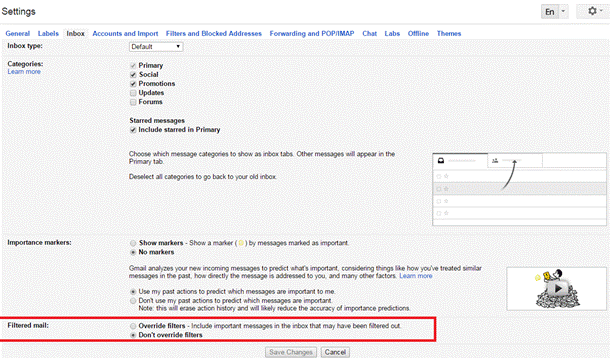
Review your TP-Link ID email filter and spam settings, and confirm that no-reply@email.tp-link.com is not filtered out (The picture below uses Gmail as an example).
Step 3. Add TP-Link to Allow list
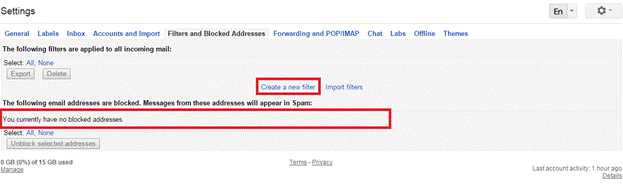
Add no-reply@email.tp-link.com to the White list by creating a new filter in your email settings.
In the Gmail Filters and Blocked Addressed setting page, you can also view the blocked email addresses of your account.
Step 4. Check Email Domain Type and Register a New TP-Link ID if needed
Some domains used by small businesses, medical, educational, or government institutions may have strict security policies that block automated emails. These domains are not recommended for TP-Link ID registration.
If possible, sign up for a new TP-Link ID using a major email provider, such as Gmail or Yahoo Mail.
Get to know more details of each function and configuration, please go to Download Center to download the manual of your product.