How to Replace the Dust Bag on Your Tapo Robot Vacuum
Gli aggiornamenti recenti potrebbero aver esteso l'accesso alle funzionalità discusse in questa FAQ. Visita la pagina di supporto del prodotto, seleziona la versione hardware corretta del dispositivo e controllae la scheda tecnica o la sezione firmware per gli ultimi miglioramenti aggiunti al prodotto. Nota che la disponibilità del prodotto varia a seconda della regione e alcuni modelli potrebbero non essere disponibili nella tua regione.
Replace the dust bag on your Tapo robot vacuum when it is full. The dust bag is disposable — dispose of the used bag and install a new one. Do not empty and reuse it. Steps vary slightly depending on your dock type.
Key Takeaways
- Replacing the dust bag on your Tapo robot vacuum is quick and easy — no tools required.
- The replacement process takes three to four simple steps, depending on your model.
- The dust bag is disposable. When it is full, dispose of it and install a new one. Do not empty and reuse it.
- The replacement process differs slightly depending on your model.
How to Replace the Dust Bag on Your Tapo Robot Vacuum
You may refer to either this video or the steps below:
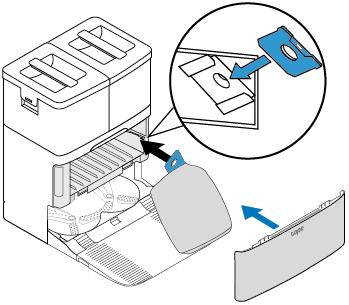
Replace the dust bag when it is full.
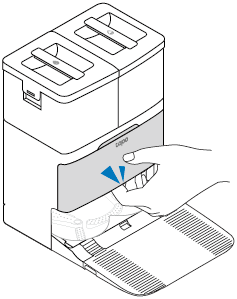
Step 1. Pull the base cover out from the opening at the bottom.
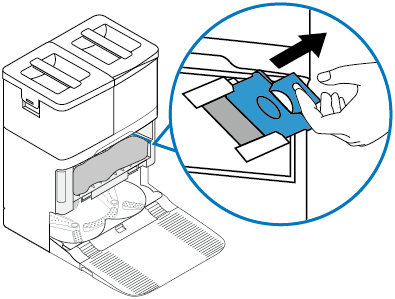
Step 2. Pull up the handle of the dust bag to remove it.
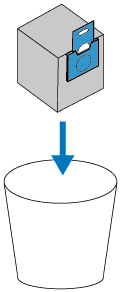
Step 3. Throw away the used dust bag when it is full.
Step 4. Install a new dust bag and put the cover back on.
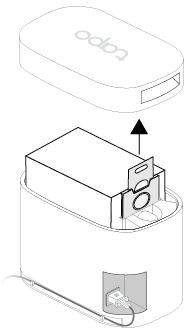
Replace the dust bag when it is full.
Step 1. Remove the cover and pull up the dust bag handle.
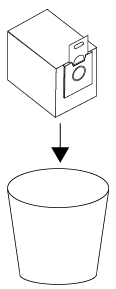
Step 2. Throw away the used dust bag when it is full.
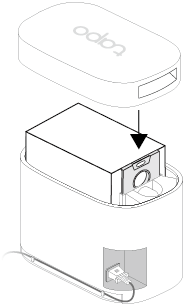
Step 3. Install a new dust bag and put the cover back on.
Note: Install the cover back each time you remove it, especially before auto-emptying.
Replace the dust bag when it is full.
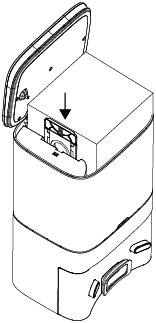
Step 1. Open the top cover and pull up the handle of the dust bag to remove.

Step 2. Throw away the used dust bag when it is full.

Step 3. Install a new dust bag and put the cover back on.
Note: Put the cover back on each time you open it, especially before emptying.

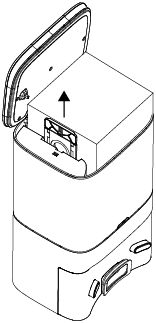
Replace the dust bag when it is full.
Step 1. Open the top cover and pull up the handle of the dust bag to remove it.
Step 2. Throw away the used dust bag.
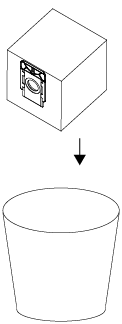
Step 3. Install a new dust bag and replace the cover.