How to replace the cleaning solution of Tapo Robot Vacuum
Gli aggiornamenti recenti potrebbero aver esteso l'accesso alle funzionalità discusse in questa FAQ. Visita la pagina di supporto del prodotto, seleziona la versione hardware corretta del dispositivo e controllae la scheda tecnica o la sezione firmware per gli ultimi miglioramenti aggiunti al prodotto. Nota che la disponibilità del prodotto varia a seconda della regione e alcuni modelli potrebbero non essere disponibili nella tua regione.
Replace when the Tapo cleaning solution is used up.
You may refer to either this video or the steps below:
Step 1. Pull the cover out from the opening at the bottom.
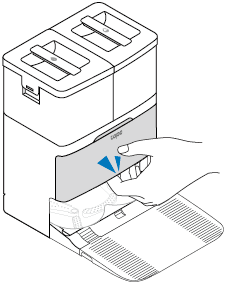
Step 2. Take out the old cleaning solution.
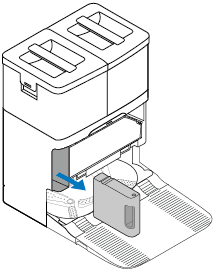
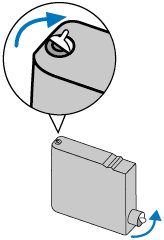
Step 3. Prepare a new Tapo cleaning solution. Make sure the seal side is facing up. Remove its seal and sticker.
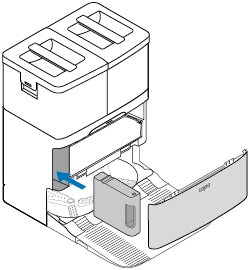
Step 4. Insert the new one to the dock and install the cover back.
Notes:
• Avoid repeatedly removing the cleaning solution to prevent damage.
• If you don’t want to use the cleaning solution after installation, you can disable this feature on the Tapo app.