How to clean the sensors of Tapo Robot Vacuum
Gli aggiornamenti recenti potrebbero aver esteso l'accesso alle funzionalità discusse in questa FAQ. Visita la pagina di supporto del prodotto, seleziona la versione hardware corretta del dispositivo e controllae la scheda tecnica o la sezione firmware per gli ultimi miglioramenti aggiunti al prodotto. Nota che la disponibilità del prodotto varia a seconda della regione e alcuni modelli potrebbero non essere disponibili nella tua regione.
You may refer to either this video or the steps below:
Wipe the sensors with a clean, damp cloth, then dry them with a dry cloth. Clean once a month.
Note: Using a wet cloth may cause damage.
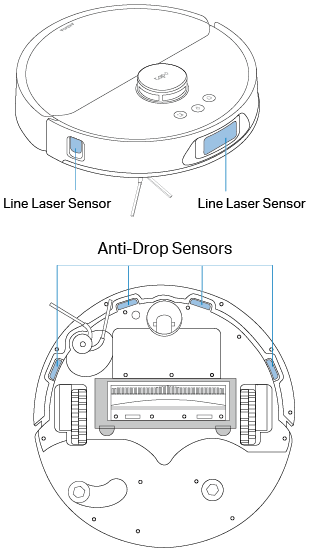
Wipe the LiDAR and sensors with a clean, dry cloth. Clean once a month.
Note: Using a wet cloth may cause damage.

Clean the LiDAR area with a cotton swab.
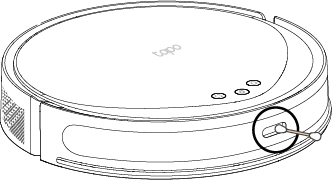
Wipe the sensors with a clean, dry cloth. Clean once a month.
Note: Using a wet cloth may cause damage.

Wipe the sensors with a clean, dry cloth. Clean once a month.
Note: Using a wet cloth may cause damage.


Wipe the sensors with a clean, dry cloth. Clean once a month.
Note: Using a wet cloth may cause damage.


Clean the LiDAR area with a cotton swab.
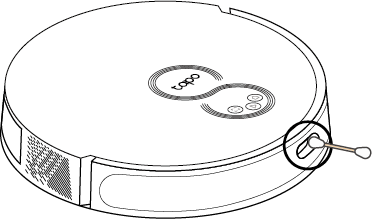
Wipe the sensors with a clean, dry cloth. Clean once a month.
Note: Using a wet cloth may cause damage.


Wipe the sensors with a clean, dry cloth. Clean once a month.
Note: Using a wet cloth may cause damage.


Wipe the sensors with a clean, dry cloth. Clean once a month.
Note: Using a wet cloth may cause damage.


Wipe the sensors with a clean, dry cloth. Clean once a month.
Note: Using a wet cloth may cause damage.


Wipe the sensors with a clean, dry cloth. Clean once a month.
Note: Using a wet cloth may cause damage.

