How to Replace the Cleaning Solution of Tapo Robot Vacuum
Son güncellemeler, bu SSS'de tartışılan özellik(ler)e erişimi genişletmiş olabilir. Ürününüzün destek sayfasını ziyaret edin, cihazınız için doğru donanım sürümünü seçin ve ürününüze eklenen en son geliştirmeler için Veri Sayfası veya ürün yazılımı bölümünü kontrol edin.
Replace when the Tapo cleaning solution is used up.
⚠️DAMAGE RISK
The cleaning solution Tapo RVA450 is formulated exclusively for the Tapo RV50 Pro Series. Do NOT use with other Tapo vacuums. Incorrect use may cause damage, corrosion, and permanent hardware failure.
You may refer to either this video or the steps below:
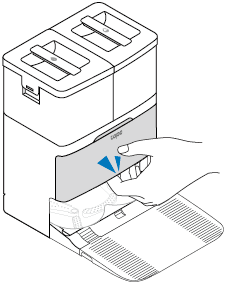
Step 1. Pull the cover out from the opening at the bottom.
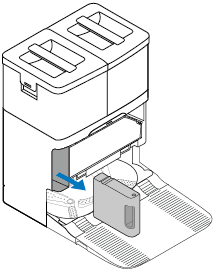
Step 2. Take out the old cleaning solution.
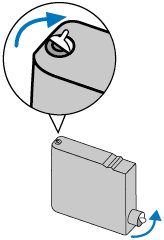
Step 3. Prepare a new Tapo cleaning solution. Make sure the seal side is facing up. Remove its seal and sticker.
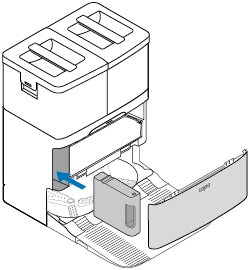
Step 4. Insert the new one to the dock and install the cover back.
Notes:
1. Avoid repeatedly removing the cleaning solution to prevent damage.
2. If you don’t want to use the cleaning solution after installation, you can disable this feature on the Tapo app.