Mini Smart Wi-Fi Plug
| Tapo P105



(US)2.0-62x58x41.5mm-7022510532_normal_20240207024930q.png)
Mini Smart Wi-Fi Plug
Tapo P105- Remote Control – Instantly turn connected devices on/off from wherever you are through the Tapo app
- Schedule – Preset a schedule to automatically manage devices
- Timer - Create countdown timer lists for connected electronics
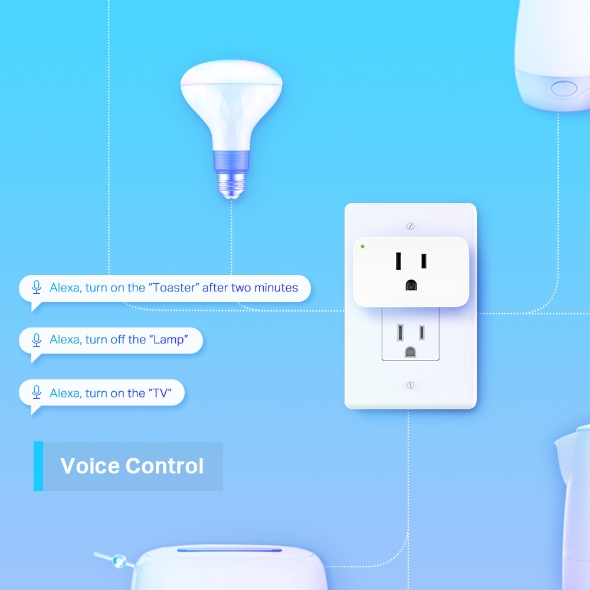
- Voice Control – Manage your smart plug with voice commands via Amazon Alexa or the Google Assistant
- Away Mode – Automatically turns devices on and off at different times to give the appearance that someone is home
- Support Higher-Power Appliances – Schedule your kettle, coffee maker, and toaster to enjoy a "preset" breakfast
- Compact Design - Mini-sized to avoid blocking adjacent sockets, (even smaller than P100)
- Easy Setup and Use - No hub required, set up quickly and manage easily through the free app
The Optimal Smart Partner for Small Appliances
Mini Smart Wi-Fi Plug P105


-
Remote Control
-
Schedule & Timer
-
Voice Control
-
Compact Design
-
Away Mode
-
Share to Family
-
Multiple Safety Guarantees
-
Easy Setup
Remote Control from Anywhere
Instantly turn connected devices on/off from wherever you are via the Tapo app. Designed to facilitate your life and help eliminate potential safety hazards.
Live Smarter by Presetting Time
Schedule and Timer features allow you to create weekly schedules and countdown plans. All of your connected electronics will automatically work at your preset time, making your life smart, convenient, and energy-saving.


Free Up Your Hands with Voice Control
Space-Saving Design
Tapo P105 is built smaller to leave adjacent plugs open, making it convenient for daily use.
Bring Intelligence to the Kitchen
Support Higher-Power Appliances
Tapo Smart Plugs eliminate morning chaos! No more worries about burning your food (or yourself) in your post wake-up haze. Prep the night before and schedule your coffee maker, toaster, kettle, and other appliances to turn on when you get to start your day with a convenient breakfast.
A Deterrent for Your Home
Away Mode, a feature that intelligently simulates someone being home by turning the plugged-in device (like a lamp) on and off, makes it appear that someone is home when you're on long trips to keep away people with ill intent.
Share to Your Family
Not limited to single control, family members can directly share management permissions with each other, saving time and enhancing user-friendliness for the elderly.
Multiple Safety Guarantees
- Under strict quality inspection by TP-Link’s lab and certification by global authority.
- UL94-V0 PC Flame-Retardant materials help minimize burning hazards.
-
Quality Inspection
-
Flame-Retardant



Enjoy Easy, Friendly Setup and Use
Unique Bluetooth onboarding Technology makes setup steps simpler for faster connection (within 20 seconds) , and eliminate pairing failures.
*No separate hub or accessories required
*Bluetooth is only used for onboarding.
*The total power of the connected electrical equipment should not exceed the max load current (15A).
*Please do not use in damp environments or outdoors.
*Frequent switching of electrical appliances may cause electrical damage.
*The Bluetooth onboarding speed is based on performance testing results. Actual time required for onboarding may vary in different network conditions and environments.
ให้การจัดการสมาร์ทโฮมเป็นเรื่องง่าาย
- 1 ดาวน์โหลดแอปฯ Tapo ฟรี จาก App Store หรือ Play Store
- 2 เชื่อมต่ออุปกรณ์ และทำการตั้งค่าตามที่แอปฯ แนะนำ
- 3 ควบคุมสั่งการอุปกรณ์ได้จากทุกที่ ทุกเวลา

ทำตามขึ้นตอนการติดตั้งที่แนะนำบนแอปฯ
-
1
 ดาวน์โหลดและเปิดใช้งานแอปฯ Tapo
 -
2
 กดปุ่มบวก (+) เพื่อเพิ่มอุปกรณ์
 -
3
 ทำการค้นหาและชื่อมต่ออุปกรณ์
 -
4
 ตั้งชื่ออุปกรณ์และเลือกตำแหน่งที่ต้ดตั้ง
 -
5
 ยินดีด้วย! คุณได้ตั้งค่าอุปกรณ์เรียบร้อยแล้ว
ดาวน์โหลด