Troubleshoot When Kasa KE100 Falls off the Valve
This article provides troubleshooting steps if your Kasa Smart Thermostatic Radiator Valve KE100 falls off the radiator valve or becomes loose after installation.
Troubleshooting Steps
Step 1. Check whether the KE100 was installed incorrectly
During installation, do not rotate the KE100 body to tighten it onto the valve.
The correct method is to keep the KE100 aligned with the M30 nut and tighten the M30 nut directly by hand.
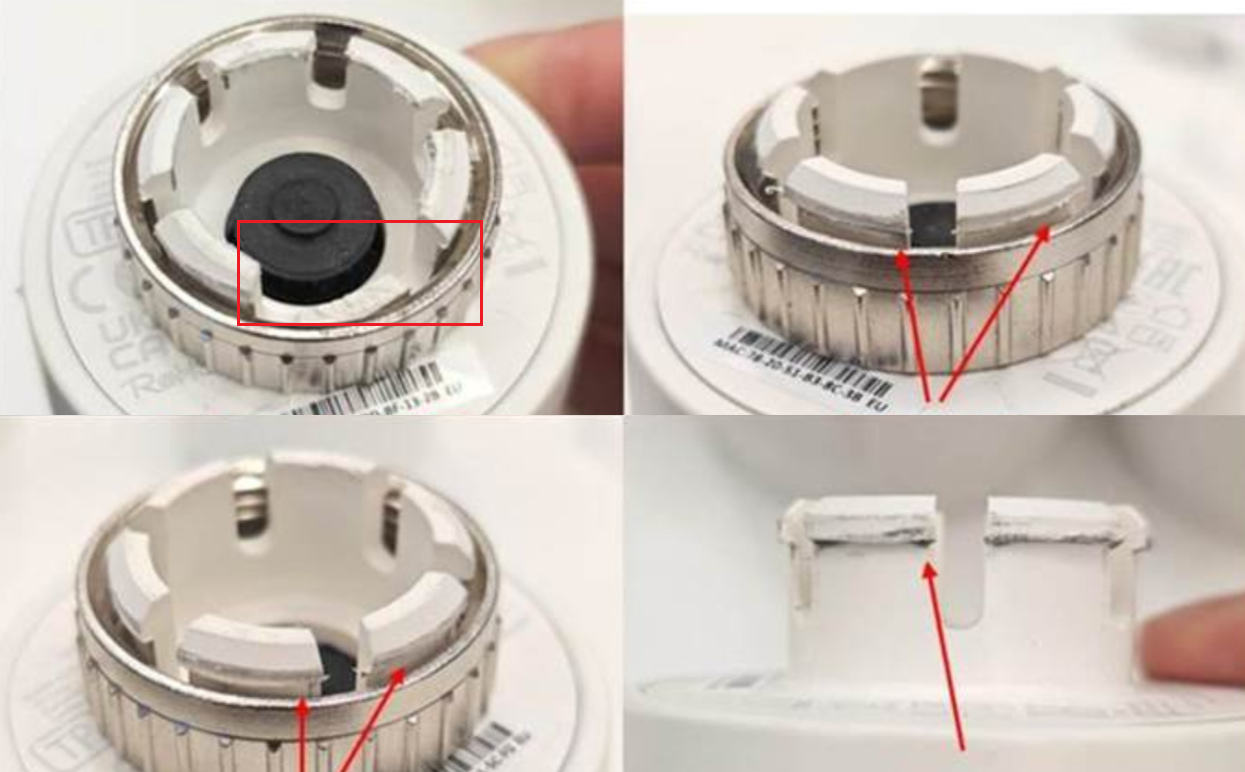
If the KE100 body is rotated while tilted, the internal clips may rub against or be squeezed by the M30 nut thread. This may cause clip wear or deformation and may eventually make the KE100 loose or fall off.
Step 2. Check whether the KE100 or M30 nut is loose
Gently hold the KE100 and the metal M30 nut, then check whether either part can wobble or move abnormally.
- If the M30 nut is loose, remove the KE100 and reinstall it by tightening the M30 nut directly.
- If the KE100 body is loose on the M30 nut, continue with the steps below.
Step 3. Check whether the clips are worn, deformed, or broken
Remove the KE100 from the valve and inspect the clips inside the device.
- If the clips are worn but not deformed or broken, the KE100 can still be used. Reinstall the KE100 by following Step 1 to ensure it is correctly and securely attached to the M30 nut.
- If the clips are deformed or broken, the KE100 may not stay securely attached to the M30 nut and cannot be used properly. In some cases, damaged clips may become stuck in the M30 nut thread, making the device difficult to remove.
If the clips are deformed or broken, please contact TP-Link Technical Support and provide the following information for warranty assistance:
- Clear photos showing the deformed or broken clips
- Proof of purchase
After the issue is resolved, reinstall the KE100 by following Step 1 to ensure proper installation.
Step 4. Reinstall the KE100 correctly
Reinstall the KE100 using the following method:
- Keep the KE100 and the M30 nut aligned as much as possible.
- Avoid tilting the KE100 during installation.
- Tighten the M30 nut directly by hand.
- Do not use the KE100 body as a handle to rotate or tighten the M30 nut.
Step 5. Check the valve adapter, if one is used
If your radiator valve requires a valve adapter, remove and inspect the adapter.
If the adapter is cracked, broken, loose, or deformed, replace the adapter and reinstall the KE100.
Step 6. Avoid applying side force after installation
After installation, avoid pulling, pushing, bending, or rotating the KE100 body.
Side force may put excessive pressure on one side of the clips, which can damage the clips and cause the KE100 to become loose or detach from the valve.
Step 7. Contact TP-Link Technical Support
If the KE100 still falls off after correct installation, or if the clips are visibly worn, deformed, or broken, please contact TP-Link Technical Support and provide the following information:
- A photo of the KE100 clips.
- A photo of the M30 nut or valve adapter.
- A photo of the radiator valve.
- Whether the M30 nut was tightened directly or the KE100 body was rotated during installation.
- Whether the KE100 has been installed and removed multiple times.