Guide d'installation
Guide d'installation Tapo RV50 Pro Omni
Bienvenue dans le guide d'installation.
Pour garantir l'égalité d'accès à tous les utilisateurs, nous proposons ce guide d'installation accessible. Conçu pour répondre aux besoins d'accessibilité, ce guide vous permettra de réaliser une installation réussie. Il vous présentera l'apparence de votre aspirateur robot, notamment ses voyants, ses boutons, ses composants et ses étiquettes, puis vous guidera tout au long du processus d'installation.
Étape 1. Familiarisez-vous avec votre aspirateur robot
Dans cette section, nous présenterons les différents boutons et composants de l'aspirateur robot, organisés par le dessus et par l'arrière, avec des emplacements spécifiques pour une meilleure accessibilité.
1. Vous trouverez votre aspirateur robot dans l'emballage.
2. Ensuite, placez votre aspirateur robot sur une surface horizontale, les roues au sol.
3. La partie saillante sur le dessus est le LiDAR, et à côté se trouvent trois boutons ronds. Assurez-vous que les boutons soient face au radar et orientés vers vous, c'est-à-dire vers l'avant du robot aspirateur. Une fois le LiDAR correctement positionné, nous vous présenterons les composants dans un ordre précis.
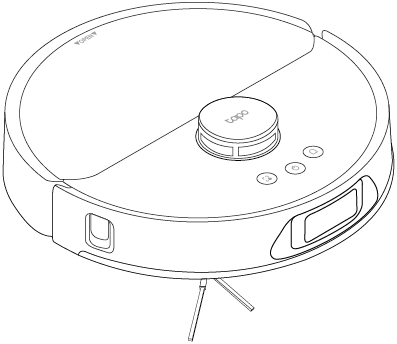
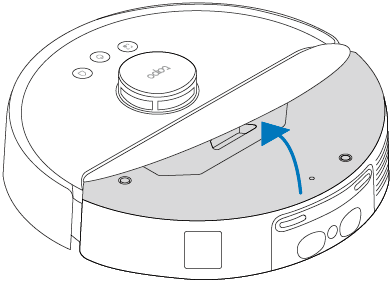
Composants principaux
LiDAR : La partie saillante sur le dessus. Mesure les distances pour cartographier votre maison et vous guider.
Boutons : Trois boutons ronds se trouvent juste en dessous du LiDAR. De gauche à droite :
• Nettoyage localisé/Sécurité enfant : Appuyez une fois pour démarrer le nettoyage localisé ; maintenez la pression pendant 5 secondes pour activer/désactiver la sécurité enfant.
• Marche/Arrêt/Nettoyage : Appuyez et maintenez enfoncé pendant 3 secondes pour allumer/éteindre l’aspirateur robot ; Appuyez une fois pour démarrer/mettre en pause le nettoyage.
• Station d'accueil : Retournez-la à la station d'accueil pour la recharger ou vider le bac à poussière lorsqu'elle y est fixée.
Appuyez simultanément sur le bouton Nettoyage localisé/Verrouillage enfant et sur le bouton Station d'accueil et maintenez-les enfoncés pendant 5 secondes pour accéder au mode de configuration ou réinitialiser le Wi-Fi ; appuyez simultanément et maintenez-les enfoncés pendant 10 secondes pour rétablir les paramètres d'usine par défaut.
Les boutons indiquent également son état (en charge, en nettoyage, etc.). Vous pouvez consulter l'application Tapo pour obtenir des informations détaillées sur l'état des LED.
Couvercle : Partie supérieure de l’aspirateur robot, à côté du capteur LiDAR. Il s’agit d’une pièce incurvée. Une poignée encastrée sur le bord supérieur permet de le soulever facilement. Ce couvercle protège les composants internes et donne accès au bac à poussière.
Bouton d'arrêt du système : Ouvrez le couvercle et vous trouverez un petit orifice sur le dessus, à 12 heures. Si l'aspirateur robot ne répond pas, vous pouvez utiliser une épingle pour appuyer sur ce bouton et l'éteindre.
Étiquette du produit : L’étiquette du produit se trouve à côté du bouton d’arrêt du système.
Pare-chocs : bord avant du robot. Empêche les collisions et facilite la navigation.
Capteur laser linéaire : centré et latéral sur le bord avant. Aide à détecter les bords et les obstacles.
Composants arrière
Contacts de charge : situés sur la face inférieure, près du haut. Deux contacts métalliques en relief permettent de connecter le robot à la station de charge.
Recharge Sensor: Located between the two raised metal contacts. Detects when the robot vacuum needs to return to its charging station.
Water Injection Port: Just under the recharge sensor. Allows for refilling water from the clean water tank of the charging dock into the robot's water tank.
Auto-Empty Vent: Next to the charging contacts area. Allows the robot to automatically empty its dustbin into the dust bag.
Step 2. Set Up
1. Get the Tapo app from the App Store or Google Play, then log in.

2. Press and hold the Power button for about 3 seconds to turn on the robot vacuum. You will hear a sound when turning on.
3. Tap the + button in the app and select your model. Follow app instructions to complete setup.
If you need help, please visit https://www.tapo.com/support/ for technical support, the user guide, FAQs, warranty & more.
For details on Tapo app accessibility, please check Accessibility Support.
IMPORTANT SAFETY INSTRUCTIONS
READ ALL INSTRUCTIONS
BEFORE USING THIS APPLIANCE
WARNING – To reduce the risk of fire, electric shock, or injury:
• Do not leave the appliance when plugged in. Unplug from the outlet when not in use and before servicing.
• Do not use outdoors or on wet surfaces.
• Do not allow to be used as a toy. Close attention is necessary when used by or near children.
• Use only as described in this manual. Use only the manufacturer’s recommended attachments.
• Do not use with a damaged cord or plug. If appliance is not working as it should, has been dropped, damaged, left outdoors, or dropped into water, return it to a service center.
• Do not pull or carry by cord, use cord as a handle, close a door on cord, or pull cord around sharp edges or corners. Do not run appliance over cord. Keep cord away from heated surfaces.
• Do not unplug by pulling on cord. To unplug, grasp the plug, not the cord.
• Do not handle plug or appliance with wet hands.
• Do not use to pick up flammable or combustible liquids, such as gasoline, or use in areas where they may be present.
• Keep hair, loose clothing, fingers, and all parts of body away from openings and moving parts.
• Turn off all controls before unplugging.
• Do not put any object into openings. Do not use with any opening blocked; keep free of dust, lint, hair, and anything that may reduce air flow.
• Do not pick up anything that is burning or smoking, such as cigarettes, matches, or hot ashes.
• Do not use without dust bag and/or filters in place.
• Use extra care when cleaning on stairs.
WARNING: Do not charge non-rechargeable batteries.
WARNING: Read all safety warnings and instructions. Failure to follow the warnings and instructions may result in electric shock, fire and/or serious injury.
Risk of explosion. Floor sanding can result in an explosive mixture of fine dust and air. Use floor-sanding machine only in a well-ventilated area free from any flame or match.
• Prevent unintentional starting. Ensure the switch is in the off-position before connecting to battery pack, picking up or carrying the appliance. Carrying the appliance with your finger on the switch or energizing appliance that have the switch on invites accidents.
• Recharge only with the charger specified by the manufacturer. A charger that is suitable for one type of battery pack may create a risk of fire when used with another battery pack.
• Use appliances only with specifically designated battery packs. Use of any other battery packs may create a risk of injury and fire.
• Under abusive conditions, liquid may be ejected from the battery; avoid contact. If contact accidentally occurs, flush with water. If liquid contacts eyes, additionally seek medical help. Liquid ejected from the battery may cause irritation or burns.
• When battery pack is not in use, keep it away from other metal objects, like paper clips, coins, keys, nails, screws or other small metal objects, that can make a connection from one terminal to another. Shorting the battery terminals together may cause burns or a fire.
• Do not use a battery pack or appliance that is damaged or modified. Damaged or modified batteries may exhibit unpredictable behavior resulting in fire, explosion or risk of injury.
• Do not expose a battery pack or appliance to fire or excessive temperature. Exposure to fire or temperature above 130°C may cause explosion.
• Follow all charging instructions and do not charge the battery pack or appliance outside of the temperature range specified in the instructions. Charging improperly or at temperatures outside of the specified range may damage the battery and increase the risk of fire.
• Do not charge the battery at ambient temperature below 39°F (4°C) or above 104 °F (40°C). Also keeping the temperature range of between 39-104°F when storing unit or during use.
• Have servicing performed by a qualified repair person using only identical replacement parts. This will ensure that the safety of the product is maintained.
• Do not modify or attempt to repair the appliance except as indicated in the instructions for use and care.
• Place the cords from other appliances out of the area to be cleaned.
• Do not operate the vacuum in a room where an infant or child is sleeping.
• Do not operate the vacuum in an area where there are lit candles or fragile objects on the floor to be cleaned.
• Do not operate the vacuum in a room that has lit candles on furniture that the vacuum may accidentally hit or bump into.
• Do not allow children to sit on the vacuum.
• Do not use the vacuum on a wet surface.
• To reduce the risk of electric shock, this appliance has a polarized plug (one blade is wider than the other). This plug will fit in a polarized outlet only one way. If the plug does not fit fully in the outlet, reverse the plug. If it still does not fit, contact a qualified electrician to install the proper outlet. Do not change the plug in any way.
• Household use only
• The charging dock must only be supplied at safety extra-low voltage defined in the standard of EN 60335-1 corresponding to the marking on the charging dock. (for EU region)
• This charging dock can only charge lithium batteries and can only charge one battery at a time. The capacity of the battery does not exceed 5200mAh.
WARNING: Do not charge non-rechargeable batteries.
SAVE THESE INSTRUCTIONS
For Robot Vacuum:
TP-Link hereby declares that the Robot Vacuum is in compliance with the essential requirements and other relevant provisions of directives 2014/53/EU, 2009/125/EC, 2011 /65/EU and (EU) 2015/863. The original EU declaration of conformity may be found at https://www.tapo.com/en/support/ce/
TP-Link hereby declares that the Robot Vacuum is in compliance with the essential requirements and other relevant provisions of the Radio Equipment Regulations 2017.
The original UK declaration of conformity may be found at https://www.tapo.com/support/ukca/
Safety Information
Keep the device away from water, fire, humidity or hot environments.
This appliance contains batteries that are only replaceable by skilled persons.
Do not attempt to disassemble, repair, or modify the device. If you need service, please contact us.
If the supply cord is damaged, it must be replaced by the manufacturer, its service agent or similarly qualified persons in order to avoid a hazard.
|
Warning Avoid replacement of a battery with an incorrect type that can defeat a safeguard. |
Les enfants doivent être surveillés afin d'éviter qu'ils ne jouent avec l'appareil.
Celui-ci doit être utilisé exclusivement avec la station de charge (Tapo RVD200) fournie.
L'appareil est équipé d'une batterie lithium-ion de 5200 mAh.
Il peut être utilisé par des enfants âgés de 8 ans et plus, ainsi que par des personnes présentant des limitations physiques, sensorielles ou mentales, ou manquant d'expérience et de connaissances, à condition qu'elles soient supervisées, qu'elles aient reçu des instructions concernant son utilisation en toute sécurité et qu'elles comprennent les risques encourus. Les enfants ne doivent en aucun cas jouer avec l'appareil. Le nettoyage et l'entretien ne doivent pas être effectués par des enfants sans surveillance.
Température de fonctionnement : 0 à 40 °C (32 à 104 °F)
Température de stockage : -20 à 60 °C (-4 à 140 °F)
Lorsque la batterie est chargée : 0 à 40 °C (32 à 104 °F)
Concernant la station d’accueil/batterie tout-en-un :
TP-Link déclare par la présente que la station d’accueil tout-en-un est conforme aux exigences essentielles et aux autres dispositions pertinentes des directives 2014/30/UE, 2014/35/UE, 2009/125/CE, 2011/65/UE et (UE)2015/863. La déclaration de conformité UE originale est disponible à l'adresse https://www.tapo.com/en/support/ce/.
TP-Link déclare par la présente que la station d'accueil tout-en-un est conforme aux exigences essentielles et aux autres dispositions pertinentes du Règlement sur la compatibilité électromagnétique de 2016 et du Règlement sur les équipements électriques (sécurité) de 2016.
La déclaration de conformité britannique originale est disponible à l'adresse https://www.tapo.com/support/ukca/. Fréquences de fonctionnement
pour la région UE/Royaume-Uni : 2 400 MHz à 2 483,5 MHz / 20 dBm (Wi-Fi) ; 2 402 MHz à 2 480 MHz / 10 dBm (Bluetooth).