LiDAR Navigation Robot Vacuum + Smart Auto-Empty Dock
| Tapo RV30C Plus
LiDAR Navigation Robot Vacuum + Smart Auto-Empty Dock
Tapo RV30C Plus- 4200Pa Hyper Suction - Sweeps away debris sandwiched between gaps and dust hidden in carpets for a deeper, powerful clean.
- LiDAR & Gyro Dual Navi System - Accurately maps out your house in minutes, avoids omissions and repeated cleaning, and even works well in the dark.
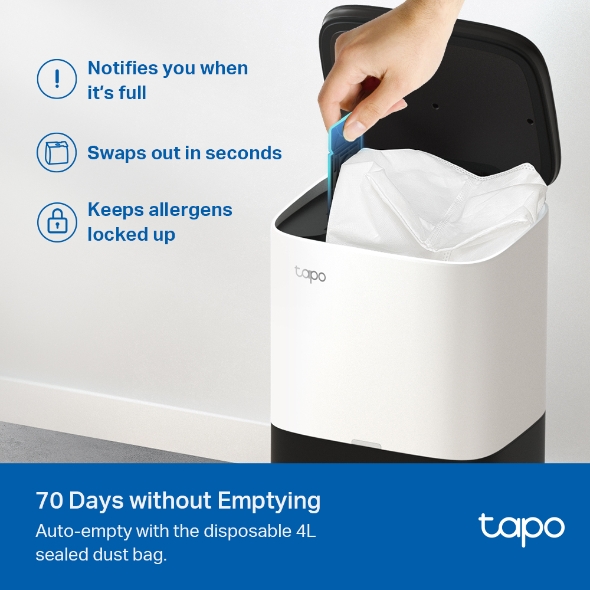
- Auto-Empty with 4L Large Dust Bag - Automatically empties the dustbin after cleaning to keep your hands free for up to 70 days.1
- Customizable Cleaning - Merge and separate areas, set a cleaning schedule, and customize clean modes for each room.
- 3-Hour Continuous Cleaning - 3200 mAh battery for long-lasting, fade-free suction.2
- Auto-Charging - Returns to the charging dock automatically when the battery gets low, and then restarts right where it left off.
- Carpet Auto-Boost - Increases the suction power when moving from a hard floor to a carpet.
- OTA Updates Supported – Upgrade to the latest firmware via Tapo App for a better experience. More features to come.
- Voice & Remote Control - Simply send voice commands via smart speakers or control via the Tapo app.
- Real-time Voice Reporting - Keeps you informed about the robot‘s current status.
1. Based on internal testing. Actual emptying intervals are subject to change due to usage and environmental factors.
2. Based on internal testing carried out by the manufacturer, using quiet vacuuming mode with a full battery. Actual results may vary according to the working status and home environment.
Walk You Through Setup Step by Step
-
1
Download and open Tapo App -
2
Tap Plus (+) to add your smart device -
3
Look for your device and connect -
4
Name the device and choose the room it’s in -
5
Congratulations! You’ve now completed the configuration
Watch the whole setup process in the whole
-
How to Clean the Side Brushes: Tapo RV30C Plus
Tapo RV30C Plus
-
How to Clean Main Wheels: Tapo RV30C Plus
Tapo RV30C Plus
-
How to Set Up Your Tapo LiDAR Navigation Robot Vacuum + Smart Auto-Empty Dock: Tapo RV30C Plus
Tapo RV30C Plus
-
How to Clean the Main Brush: Tapo RV30C Plus
Tapo RV30C Plus
-
How to Clean Charging Contacts: Tapo RV30C Plus
Tapo RV30C Plus
-
How to Clean Up the Dust Channel: Tapo RV30C Plus
Tapo RV30C Plus
-
How to Replace the Dust Bag: Tapo RV30C Plus
Tapo RV30C Plus
-
How to Clean LiDAR and Sensors: Tapo RV30C Plus
Tapo RV30C Plus
-
How to Clean the Caster Wheel: Tapo RV30C Plus
Tapo RV30C Plus
-
How to Empty the Dustbin: Tapo RV30C Plus
Tapo RV30C Plus
-
How to Clean the Filter: Tapo RV30C Plus
Tapo RV30C Plus
Specifications
Downloads
Videos
How to Set Up Your Tapo LiDAR Navigation Robot Vacuum + Smart Auto-Empty Dock: Tapo RV30C Plus
Tapo RV30C Plus
FAQ
- How to update the firmware of the Tapo&Kasa devices on the Tapo App
- How to find the hardware and firmware version of my TP-Link device
- How to set up routines for Tapo devices via Alexa app
- Why cannot I receive the SMS verification code from Tapo app?
- How to unlink third-party accounts from your TP-Link ID
- What to do if my Tapo Robot Vacuum has messy/chaotic/abnormal cleaning paths
- Matter QAs for Tapo Robot Vacuum
- Why do I receive a "We Noticed a New Login" email?
- What to do if the Tapo Robot Vacuum shows an overlapping/slanted/distorted map
- How to create 3D Map in the Tapo App for Pad
We use cookies and browser activity to improve your experience, personalize content and ads, and analyze how our sites are used. For more details, please read our Privacy Policy.
Your Privacy Choices
We use cookies and browser activity to improve your experience, personalize content and ads, and analyze how our sites are used. For more details, please read our Privacy Policy.
Basic Cookies
These cookies are necessary for the website to function and cannot be deactivated in your systems.
Tapo
JSESSIONID, tapo_privacy_base, tapo_privacy_marketing,tapo_top-banner, tapo_popup-right-bottom, tapo_popup-right-middle, tapo_popup-center, tapo_popup-bottom
Youtube
id, VISITOR_INFO1_LIVE, LOGIN_INFO, SIDCC, SAPISID, APISID, SSID, SID, YSC, __Secure-1PSID, __Secure-1PAPISID, __Secure-1PSIDCC, __Secure-3PSID, __Secure-3PAPISID, __Secure-3PSIDCC, 1P_JAR, AEC, NID, OTZ
Analysis and Marketing Cookies
Analysis cookies enable us to analyze your activities on our website in order to improve and adapt the functionality of our website.
The marketing cookies can be set through our website by our advertising partners in order to create a profile of your interests and to show you relevant advertisements on other websites.
Google Analytics & Google Tag Manager & Google Optimize
_gid, _ga_<container-id>, _ga, _gat_gtag_<container-id>
Crazy Egg
cebsp_, _ce.s, _ce.clock_data, _ce.clock_event, cebs