How to replace the cleaning solution of Tapo Robot Vacuum
Door recente updates is de toegang tot genoemde functie(s) in deze FAQ mogelijk uitgebreid. Ga naar de ondersteuningspagina van uw product, selecteer de juiste hardwareversie voor uw apparaat en controleer de sectie Gegevensblad of Firmware voor de laatste verbeteringen die aan uw product zijn toegevoegd. Let op: De productbeschikbaarheid verschilt per regio en sommige modellen zijn mogelijk niet beschikbaar in uw regio.
Replace when the Tapo cleaning solution is used up.
You may refer to either this video or the steps below:
Step 1. Pull the cover out from the opening at the bottom.
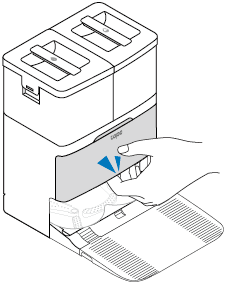
Step 2. Take out the old cleaning solution.
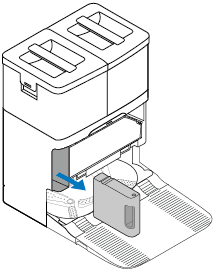
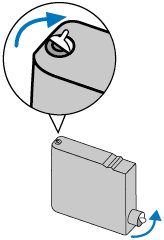
Step 3. Prepare a new Tapo cleaning solution. Make sure the seal side is facing up. Remove its seal and sticker.
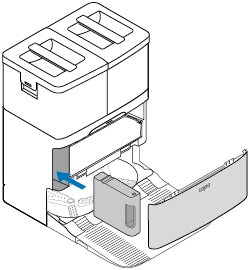
Step 4. Insert the new one to the dock and install the cover back.
Notes:
• Avoid repeatedly removing the cleaning solution to prevent damage.
• If you don’t want to use the cleaning solution after installation, you can disable this feature on the Tapo app.