How to replace the cleaning solution of Tapo Robot Vacuum
Nedávné aktualizace mohou rozšířit přístup k funkcím popsaným v tomto FAQ. Navštivte stránku podpory vašeho produktu, vyberte správnou verzi hardwaru pro vaše zařízení a podívejte se do datasheetu nebo do sekce firmwaru, kde najdete nejnovější vylepšení přidaná do vašeho produktu. Upozorňujeme, že dostupnost produktů se liší podle regionu a některé modely nemusí být ve vašem regionu dostupné.
Replace when the Tapo cleaning solution is used up.
You may refer to either this video or the steps below:
Step 1. Pull the cover out from the opening at the bottom.
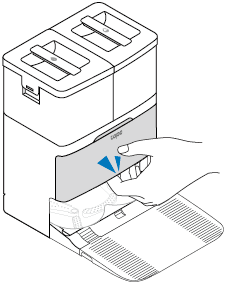
Step 2. Take out the old cleaning solution.
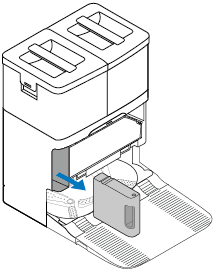
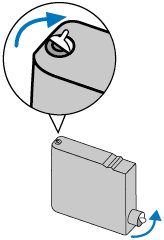
Step 3. Prepare a new Tapo cleaning solution. Make sure the seal side is facing up. Remove its seal and sticker.
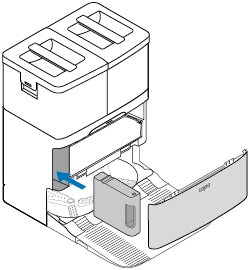
Step 4. Insert the new one to the dock and install the cover back.
Notes:
• Avoid repeatedly removing the cleaning solution to prevent damage.
• If you don’t want to use the cleaning solution after installation, you can disable this feature on the Tapo app.