How to Replace the Battery for Tapo Smart Button
Nedávné aktualizace mohou rozšířit přístup k funkcím popsaným v tomto FAQ. Navštivte stránku podpory vašeho produktu, vyberte správnou verzi hardwaru pro vaše zařízení a podívejte se do datasheetu nebo do sekce firmwaru, kde najdete nejnovější vylepšení přidaná do vašeho produktu. Upozorňujeme, že dostupnost produktů se liší podle regionu a některé modely nemusí být ve vašem regionu dostupné.
Appearance:
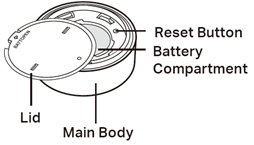
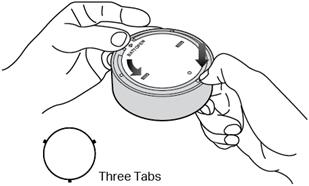
1. Hold the main body by the small tabs to prevent free rotation. Then twist the lid anticlockwise and remove the lid.
2. Remove the old battery.
3. Insert the new battery into the battery compartment, making sure the battery is level and its positive side is facing up.
4. Put the lid back on the device.
QA
Q1: How do I check the battery level through the app?
A1: The current battery level is not displayed in the app.
Q2: How do I know when the battery is low so I can replace it?
A2: You will receive a notification in the app when the battery level is low.
To get to know more details of each function and configuration please go to Download Center to download the manual of your product.