Indoor/Outdoor Home Security Wi-Fi Camera
| Tapo C120


Indoor/Outdoor Home Security Wi-Fi Camera
Tapo C120- Indoor & Outdoor 24/7 Monitoring: Place it in your living room, baby's room, backyard, or front door for round-the-clock coverage and IP66-rated weather resistance.
- Sharper Than Standard HD: With 2K video resolution, you'll see more detail than 1080p video. Identify important moments with greater clarity.
- Smarter Alerts, Fewer Distractions: AI-powered detection identifies people, vehicles, and pets that come into frame, reducing unnecessary notifications from irrelevant activity.
- Color Night Vision: Built-in spotlights help provide colorful nighttime footage, making it easier to see important details after dark.
- Naptime-Friendly Night Vision: Invisible night vision keeps an eye on your sleeping baby without the distraction of visible red lights, while baby crying alerts notify you when your attention is needed.
- Flexible Placement: The magnetic base enables quick installation, while the 9.8 ft. power cord provides extra reach for easier placement.


Outdoor or Indoor.
Stay Protected Anywhere.
2K Smart Plug-In Wi-Fi Security Camera
Tapo C120





Indoor/Outdoor Versatility. Almost anywhere

Exquisite Design
Exquisite design suitable for
diversified indoor scenarios.
IP66 Weatherproof
Mounted even in extreme external weather conditions to keep an eye on your home.


-


Robust IP66 Weatherproofing
Secure Installation with Weatherproof
Mounts securely in your desired placement under different weather condition with IP66 Weatherproofing.
-


Versatile Magnetic Mount
Magnetic Mount for Easy Installation
A magnetic mount and a long 9.8ft. power cord provides flexible mounting options.
Free Smart AI Detection
With smart AI detection,choose to detect vehicles,pets,people,or all three.
Sound & Baby Cry Detection
Be notified of sound that is detected as well as the cries of a baby.
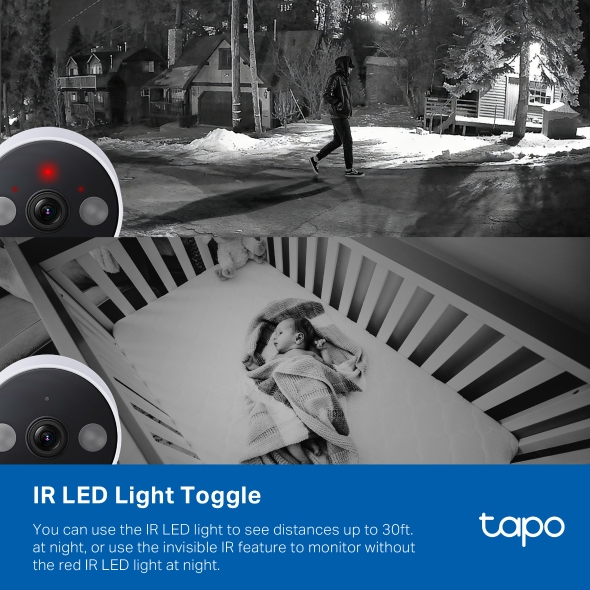
IR Toggle (Red Lights) For Night Vision
-
IR LED On
The IR light assists in providing night vision visibility up to 30 ft. It is also a great deterrent to let passersby know that your home is being monitored.

-
Invisible IR On
If the red IR LEDs are a distraction, you can switch to invisible IR mode to monitor during the night without having the red IR indicator. Ideal for indoor scenarios with children and pets.

Secure Local & Cloud Storage
Save recorded videos to a microSD card†(up to 512 GB) or by using Tapo Care** cloud services.

Up to 512 GB local storage† equals 680 hours (about 28 days) of 2K QHD footage, freeing you from being stuck with limited built-in storage.

Receive rich notifications with snapshots, encrypted protection, data backups, and 30-day video clip history with Tapo Care** cloud services.
**Tapo Care cloud storage services require a subscription. A free trial for the first month is provided.

-
 Please leave it at the door,
thank you!Ok. You got it!Full Duplex Two-Way Audio
Now you can converse with the subject as if you are talking on the phone. No more walkie talkie-esque back and forth with Full Duplex audio.
-

Alexa, show baby room camera
Voice Activated View
Check in on your loved ones when used with a supported device. Works with Alexa and Google Assistant.
Dual-Spotlights for Improved Discovery
-

Better Visibility in Any Condition
With dual-spotlights the Tapo C120 provides a better viewing experience especially in low light conditions.
-

Light and Custom Sound Triggers
The camera can be set to have the spotlights turn on when motion is detected. You can also customize sound to play in the event of a motion trigger.
Our Commitment to Keeping You Safe
In today's connected world, protecting your online and IoT safety is essential. That's why we take your security seriously.
Our participation in the “Secure by Design” pledge sponsored by the U.S. Cybersecurity and Infrastructure Security Agency (CISA) means that we prioritize your security at every level.
-
Your Data, Securely Protected
Our products are built with advanced security features designed to safeguard your personal information and data.
-
Expertly Tested for Your Safety
We rigorously test our devices, both internally and with help from independent labs. Our team of experts works hard to find and fix any security issues before they can affect you.
-
Unique Product Features for Privacy
Many of our smart security cameras include features like physical shutters and privacy zones, putting you in control of your privacy.
†microSD card purchased separately. Actual storage capacity depends on the size of the microSD card used.
**Subscribe for cloud storage service at http://www.tapo.com/tapocare
Please be aware that our product requires connection to a power source for normal operation. All images and graphics provided are solely for marketing and visual reference purposes and may not reflect the exact details of the actual product. We strive to ensure the accuracy of all information but accept no liability for any misunderstandings or misinterpretations resulting from the use of these images or information. We recommend thoroughly understanding the product's features and requirements before purchasing.
Tapo App Support
- 1 Download the free app
- 2 Plug in and connect
- 3 Control from anywhere




Walk You Through Setup Step by Step
-
1
 Download and open Tapo App
 -
2
 Tap Plus (+) to add your smart device
 -
3
 Look for your device and connect
 -
4
 Name the device and choose the room it’s in
 -
5
 Congratulations! You’ve now completed the configuration
Downloads