Cámara inteligente Wi-Fi de vigilancia 360º
| Tapo C520WS



_1.0-210x160x145mm-7022510880_large_20240509020024n_normal_20251119153632r.png)
Cámara inteligente Wi-Fi de vigilancia 360º
Tapo C520WS- Video 2K QHD: Con una resolución de 2560 × 1440, Tapo C520WS ofrece 1.7+ pixeles para imágenes nítidas de 1080px.
- Visión Nocturna Starlight a Color: Al adoptar una lente de gran apertura F1.6 y un sensor de luz estelar, Tapo C520WS captura más luz y tiene una mayor fotosensibilidad, por lo que reproduce colores más brillantes en condiciones de poca luz que las cámaras de visión nocturna a todo color con una lente F2.2 y un sensor normal.
- Cobertura Visual 360°: Proporciona un rango de visión horizontal de 360° y vertical de 130°, lo que le permite concentrarse en áreas más vitales y eliminar puntos ciegos.
- Detección Inteligente de Personas/Mascotas/Autos: La IA inteligente identifica personas, mascotas y vehículos y notifica a los usuarios según sea necesario.
- Alarma Personalizable de Luz y Sonido: Graba tu propio audio como alarma para ampliar tus usos. La luz ultrabrillante y ajustable también es compatible para ahuyentar a los visitantes no deseados.
- Almacenamiento Local y/o en la Nube: Guarde vídeos grabados en una tarjeta microSD† o utilice los servicios en la nube de Tapo Care**.
- Protección IP66: Ofrece un excelente rendimiento a prueba de agua y polvo para escenarios al aire libre.
- Conexión por Cable o Inalámbrica: Conecte su cámara a la red a través de WiFi o Ethernet para una instalación más flexible.
Obtenga más información sobre la compatibilidad de la tarjeta microSD
Smart. Secure. Easy.
All-Round Protection with Vivid Colors
Outdoor Pan/Tilt Security Wi-Fi Camera
Tapo C520WS


- Brighter than Full-Color
- See Colors in Low Light
- Multiple Night Vision Modes
Brighter than Full-Color
TapoC520WS renders brighter images than other full-color night vision cameras with spotlights on due to its starlight sensor.
See Colors in Low Light
Equipped with an F1.6 large-aperture lens and starlight sensor, TapoC520WS captures more light and has higher photosensitivity, revealing colorful images even without spotlights on.
Multiple Night Vision Modes
Tapo C520WS offers 3 night vision modes to choose from. Full-Color Mode provides 24/7 full-time colors while Smart Mode will only turn on spotlights for colorful pictures when an event is detected. Infrared Mode is also supported for your convenience.
- 2K QHD
- 360° Visual Coverage
2K QHD Crystal Clear View
Now with 1.7 times more pixels than 1080p, providing clearer videos and more crisp photos.
360° Visual Coverage
Provides 360° horizontal & 130° vertical view range to capture everything around.
Multiple AI Detection, All for Free!
Smart AI identifies people, pets, and vehicles, notifying users as needed. All are provided for free.
Customize Your Detection
Adjust the sensitivity of motion detection and set up activity zones/boundaries for your convenience. You can also turn on the patrol mode to keep the camera cruising between two customized points.
-
Motion Detection
-
Activity Zones
-
Line Crossing
Detection -
Patrol Mode
Reliable Networking, Flexible Connection
Dual powerful external antennas provides larger wireless coverage(up to 492 ft in open areas*) and more stable connection. You can also connect you’re your camera to the network through the RJ45 Ethernet port.

Dual Powerful Antennas
Up to 492ft
in open areas*
Wired/Wireless Networking
*The 492 ft wireless coverage is based on TP-Link tests in open areas. Actual experience may vary due to environment, router specifications, and other factors.
Customizable Sound and Light Alarm
Record your own audio as an alarm to extend your usages. The ultra-bright and adjustable light is also supported to frighten unwanted visitors away.
Private Zones, Get Away There!
Secure Local & Cloud Storage
Save recorded videos to a microSD card† (up to 512 GB) or by using Tapo Care** cloud services.
-
 Enjoy 24/7 continuous recording and playback with a microSD card† (up to 512 GB, equals
to 680
hours of 2K QHD footage).
Enjoy 24/7 continuous recording and playback with a microSD card† (up to 512 GB, equals
to 680
hours of 2K QHD footage).
-
 Receive rich notifications with snapshots, encrypted protection, data backups, and 30-day video
clip history with Tapo Care** cloud services.
**Tapo Care cloud storage services require a subscription.
A free trial for the first month is provided.
Receive rich notifications with snapshots, encrypted protection, data backups, and 30-day video
clip history with Tapo Care** cloud services.
**Tapo Care cloud storage services require a subscription.
A free trial for the first month is provided.

IP66 Weatherproof
Offers excellent waterproof and dustproof performance for outdoor scenarios.

Smart Motion Tracking
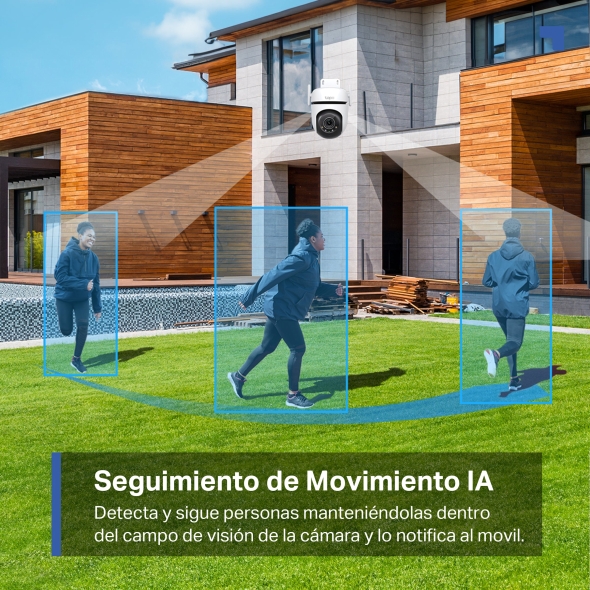
Tracks motion with high-speed rotation to keep the object within the camera’s view.

Two-Way Audio
Communicate directly with the outdoors for your convenience.

Multiple Installation Options
Use the mounting screws, template and loops‡ to install on any wall, ceiling or pole for the perfect view—wherever you want.

Physical Privacy Mode
Maintains your privacy with the lens physically blocked by the housing.

Voice Activated
Enjoy your smart life and keep an eye on your vital areas with Alexa & Google Assistant supported.
Dedicated Tapo App
Live view, playback,save clips and set up-all in one app.
Download the Tapo app
Turn on your camera
Follow the in-app guide
†Tarjeta microSD comprada por separado. La capacidad de almacenamiento real depende del tamaño de la tarjeta microSD utilizada. El tiempo de almacenamiento real también puede variar según el uso.
**Subscripción para almacenamiento en la nube http://www.tapo.com/tapocare/
‡Los bucles de montaje se compran por separado.
Tapo App Support
- 1 Download the free app
- 2 Plug in and connect
- 3 Control from anywhere




Walk You Through Setup Step by Step
-
1
 Download and open Tapo App
 -
2
 Tap Plus (+) to add your smart device
 -
3
 Look for your device and connect
 -
4
 Name the device and choose the room it’s in
 -
5
 Congratulations! You’ve now completed the configuration
Downloads