


This guide will show you how to add your Tapo smart door lock to Amazon Alexa. Once added, you can control your lock with simple voice commands.
Note: Please update both the Tapo app and the Tapo smart door lock to the latest version first.
Link Tapo service with Alexa
To get started, make sure your Tapo smart door lock is set up and online. There are two options for connecting the Tapo smart door lock to Amazon Alexa.
Option 1:
1. Open the Tapo /Kasa app, go to Me > Third-Party Services > Amazon Alexa. You can access the Me page by tapping Me in the bottom-right corner or your profile picture in the top-left corner.
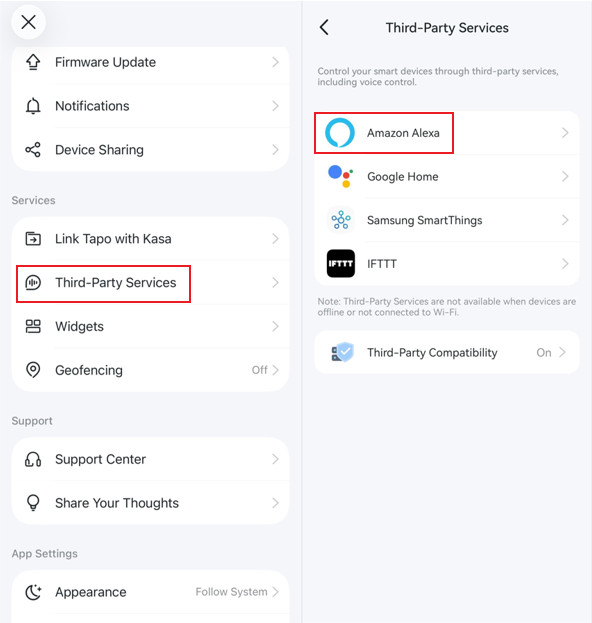
2. Then tap Tapo Skill and follow the instructions to link your Tapo account with Alexa. Once linked successfully, the message Tapo Skill is Now Linked will come up.


3. Tap the message to go to the Amazon Alexa app. After enabling the Tapo Skill, Alexa will connect to your device automatically.

4. Tap your door lock. Unlocking is disabled by default. Tap the gear icon to go to the Settings page, and turn on Unlock by app and Enable Unlock and then create an access code. This code is required if you want to unlock your smart door lock by voice or Echo Hub. You can control your device via the Alexa app now.


Option 2:
1. Open the Amazon Alexa app. Then tap on More in the lower right corner and select Skills & Games.

2. Enter and search for Tapo.


3. Tap the ENABLE TO USE button.

4. Follow the instructions to link your Tapo account with Alexa.


5. Once linked, Alexa will discover and connect to your device automatically. Tap the message to go to the Amazon Alexa app. After enabling the Tapo Skill, Alexa will connect to your device automatically.

6. Tap your door lock. Unlocking is disabled by default. Tap the gear icon to go to the Settings page, and turn on Unlock by app and Enable Unlock and then create an access code. This code is required if you want to unlock your smart door lock by voice or Echo Hub. You can control your device via the Alexa app now.


Enjoy!
You can control your Tapo smart door lock using the Alexa app and simple voice commands. For example: “Alexa, unlock ‘Smart Lock’ after two minutes”.
Note: Every time you change the name of the Tapo device, you will need to discover the device again to update its name.